
Zendesk Integración
Sin datos de tarjeta
Sin compromiso













;fill-opacity:1;'%20d='M%2019.511719%2039.964844%20C%208.304688%2039.964844%200%2031.289062%200%2020.324219%20L%200%2020.230469%20C%200%209.363281%208.160156%200.46875%2019.847656%200.46875%20C%2027.023438%200.46875%2031.320312%202.878906%2034.847656%206.375%20L%2029.519531%2012.492188%20C%2026.59375%209.820312%2023.59375%208.179688%2019.800781%208.179688%20C%2013.390625%208.179688%208.761719%2013.53125%208.761719%2020.085938%20L%208.761719%2020.203125%20C%208.761719%2026.757812%2013.273438%2032.203125%2019.800781%2032.203125%20C%2024.144531%2032.203125%2026.808594%2030.46875%2029.808594%2027.722656%20L%2035.136719%2033.121094%20C%2031.199219%2037.335938%2026.855469%2039.964844%2019.511719%2039.964844%20'/%3e%3cpath%20style='%20stroke:none;fill-rule:nonzero;fill:rgb(26.274511%25,42.352942%25,94.901961%25);fill-opacity:1;'%20d='M%2035.878906%200.0351562%20L%2044.136719%200.0351562%20L%2044.136719%2039.867188%20L%2035.878906%2039.867188%20Z%20M%2035.878906%200.0351562%20'/%3e%3cpath%20style='%20stroke:none;fill-rule:nonzero;fill:rgb(26.274511%25,42.352942%25,94.901961%25);fill-opacity:1;'%20d='M%2059.472656%2016.15625%20C%2056.039062%2016.15625%2053.808594%2018.613281%2053.160156%2022.375%20L%2065.617188%2022.375%20C%2065.113281%2018.664062%2062.953125%2016.15625%2059.472656%2016.15625%20M%2073.535156%2027.578125%20L%2053.28125%2027.578125%20C%2054.097656%2031.335938%2056.710938%2033.3125%2060.40625%2033.3125%20C%2063.191406%2033.3125%2065.183594%2032.445312%2067.464844%2030.300781%20L%2072.191406%2034.492188%20C%2069.480469%2037.867188%2065.566406%2039.941406%2060.289062%2039.941406%20C%2051.527344%2039.941406%2045.070312%2033.769531%2045.070312%2024.832031%20L%2045.070312%2024.710938%20C%2045.070312%2016.347656%2051%209.480469%2059.472656%209.480469%20C%2069.191406%209.480469%2073.65625%2017.074219%2073.65625%2025.363281%20L%2073.65625%2025.457031%20C%2073.65625%2026.300781%2073.609375%2026.808594%2073.535156%2027.578125%20'/%3e%3cpath%20style='%20stroke:none;fill-rule:nonzero;fill:rgb(26.274511%25,42.352942%25,94.901961%25);fill-opacity:1;'%20d='M%2089.375%2039.796875%20L%2081.863281%2039.796875%20L%2070.390625%2010.324219%20L%2079.152344%2010.324219%20L%2085.679688%2029.914062%20L%2092.257812%2010.324219%20L%20100.847656%2010.324219%20Z%20M%2089.375%2039.796875%20'/%3e%3cpath%20style='%20stroke:none;fill-rule:nonzero;fill:rgb(26.274511%25,42.352942%25,94.901961%25);fill-opacity:1;'%20d='M%20111.550781%2016.15625%20C%20108.121094%2016.15625%20105.886719%2018.613281%20105.238281%2022.375%20L%20117.695312%2022.375%20C%20117.191406%2018.664062%20115.03125%2016.15625%20111.550781%2016.15625%20M%20125.617188%2027.578125%20L%20105.359375%2027.578125%20C%20106.175781%2031.335938%20108.792969%2033.3125%20112.488281%2033.3125%20C%20115.246094%2033.3125%20117.265625%2032.445312%20119.542969%2030.300781%20L%20124.273438%2034.492188%20C%20121.558594%2037.867188%20117.648438%2039.941406%20112.367188%2039.941406%20C%20103.609375%2039.941406%2097.152344%2033.769531%2097.152344%2024.832031%20L%2097.152344%2024.710938%20C%2097.152344%2016.347656%20103.078125%209.480469%20111.550781%209.480469%20C%20121.273438%209.480469%20125.734375%2017.074219%20125.734375%2025.363281%20L%20125.734375%2025.457031%20C%20125.734375%2026.300781%20125.6875%2026.808594%20125.617188%2027.578125%20'/%3e%3cpath%20style='%20stroke:none;fill-rule:nonzero;fill:rgb(26.274511%25,42.352942%25,94.901961%25);fill-opacity:1;'%20d='M%20143.566406%2018.757812%20C%20138.070312%2018.757812%20134.710938%2022.085938%20134.710938%2029.074219%20L%20134.710938%2039.867188%20L%20126.457031%2039.867188%20L%20126.457031%2010.613281%20L%20134.710938%2010.613281%20L%20134.710938%2016.519531%20C%20136.390625%2012.46875%20139.128906%209.867188%20144%2010.085938%20L%20144%2018.757812%20Z%20M%20143.566406%2018.757812%20'/%3e%3c/g%3e%3c/svg%3e)




;fill-opacity:1;'%20d='M%20144.558594%2039.894531%20L%20155.4375%209.839844%20C%20155.4375%209.839844%20147.28125%209.839844%20139.121094%2011.515625%20L%20128.867188%2039.894531%20Z%20M%20142.675781%201.78125%20L%20140.585938%207.539062%20C%20148.738281%205.863281%20156.902344%205.863281%20156.902344%205.863281%20L%20158.992188%200.105469%20C%20158.992188%200.105469%20150.832031%200.105469%20142.675781%201.78125%20M%2085.980469%2032.773438%20C%2090.898438%2033.71875%2095.914062%2034.136719%20101.039062%2034.136719%20C%20106.375%2034.136719%20110.140625%2032.984375%20110.554688%2029.320312%20C%20110.765625%2027.640625%20109.089844%2026.382812%20106.167969%2024.707031%20C%20102.816406%2022.824219%2099.894531%2021.878906%2096.960938%2019.886719%20C%2094.03125%2017.898438%2092.78125%2014.859375%2093.71875%2011.507812%20C%2094.871094%207.636719%2097.585938%205.4375%20101.664062%203.34375%20C%20106.480469%200.9375%20110.242188%20-0.0078125%20119.550781%20-0.0078125%20C%20125.40625%20-0.0078125%20131.054688%200.515625%20136.597656%201.667969%20L%20134.609375%207.113281%20C%20129.691406%206.167969%20124.675781%205.75%20119.550781%205.75%20C%20114.214844%205.75%20110.453125%206.90625%20110.035156%2010.570312%20C%20109.828125%2012.246094%20111.5%2013.503906%20114.425781%2015.179688%20C%20117.773438%2017.066406%20120.695312%2018.011719%20123.628906%2020%20C%20126.558594%2021.988281%20127.808594%2025.027344%20126.871094%2028.378906%20C%20125.71875%2032.253906%20123.003906%2034.449219%20118.925781%2036.542969%20C%20114.113281%2038.949219%20110.347656%2039.894531%20101.039062%2039.894531%20C%2095.183594%2039.894531%2089.535156%2039.375%2083.992188%2038.21875%20Z%20M%2062.34375%2039.894531%20L%2071.441406%2014.867188%20C%2074.476562%206.488281%2063.390625%209.527344%2060.875%2011.515625%20C%2058.890625%2012.984375%2055.332031%2016.441406%2054.078125%2020.105469%20L%2046.859375%2040%20L%2031.175781%2040%20L%2040.273438%2014.867188%20C%2043.308594%206.488281%2032.222656%209.527344%2029.710938%2011.515625%20C%2027.722656%2012.984375%2024.167969%2016.441406%2022.910156%2020.105469%20L%2015.691406%2040%20L%200.0078125%2040%20L%2014.441406%200.105469%20C%2019.464844%200.105469%2022.179688%201.257812%2024.375%203.457031%20C%2025.207031%204.289062%2025.734375%205.339844%2026.046875%206.496094%20C%2028.980469%204.714844%2031.589844%203.351562%2033.371094%202.726562%20C%2036.613281%201.46875%2040.691406%200.105469%2045.714844%200.105469%20C%2050.734375%200.105469%2053.453125%201.257812%2055.644531%203.457031%20C%2056.480469%204.289062%2057.007812%205.339844%2057.320312%206.496094%20C%2060.25%204.714844%2062.863281%203.351562%2064.640625%202.726562%20C%2067.886719%201.46875%2071.964844%200.113281%2076.984375%200.113281%20C%2082.007812%200.113281%2084.722656%201.265625%2086.917969%203.464844%20C%2089.21875%205.660156%2089.113281%209.742188%2088.28125%2012.050781%20L%2078.027344%2039.902344%20L%2062.34375%2039.902344%20Z%20M%2062.34375%2039.894531%20'/%3e%3c/g%3e%3c/svg%3e)

;fill-opacity:1;'%20d='M%202.453125%209.882812%20L%202.453125%2012.851562%20L%207.304688%2012.851562%20L%2016.800781%2030.734375%20L%2028.488281%2030.734375%20L%2037.980469%2012.824219%20L%2042.832031%2012.792969%20L%2042.84375%209.882812%20L%2028.328125%209.882812%20L%2028.328125%2012.804688%20L%2032.195312%2012.804688%20L%2025.488281%2025.515625%20L%2018.234375%2012.847656%20L%2023.527344%2012.824219%20L%2023.515625%209.882812%20Z%20M%2096.097656%209.882812%20L%2096.097656%2012.851562%20L%20100.949219%2012.851562%20L%20110.445312%2030.734375%20L%20122.128906%2030.734375%20L%20131.625%2012.824219%20L%20136.476562%2012.792969%20L%20136.484375%209.882812%20L%20121.972656%209.882812%20L%20121.972656%2012.804688%20L%20125.835938%2012.804688%20L%20119.132812%2025.515625%20L%20111.878906%2012.847656%20L%20117.167969%2012.824219%20L%20117.160156%209.882812%20Z%20M%2072.222656%209.882812%20L%2072.222656%2012.851562%20L%2077.078125%2012.851562%20L%2077.082031%2027.453125%20L%2071.96875%2027.453125%20L%2071.96875%2030.707031%20L%2077.085938%2030.734375%20L%20101.3125%2030.734375%20L%20101.3125%2021.027344%20L%2098.15625%2021.027344%20C%2097.984375%2026.167969%2093.542969%2027.457031%2091.675781%2027.457031%20C%2089.960938%2027.457031%2086.640625%2027.453125%2086.640625%2027.453125%20L%2086.640625%2012.847656%20L%2091.417969%2012.824219%20L%2091.410156%209.882812%20Z%20M%2055.890625%209.285156%20C%2047.644531%209.285156%2040.960938%2014.214844%2040.960938%2020.292969%20C%2040.960938%2026.375%2047.644531%2031.304688%2055.890625%2031.304688%20C%2064.136719%2031.304688%2070.824219%2026.375%2070.824219%2020.292969%20C%2070.824219%2014.214844%2064.136719%209.285156%2055.890625%209.285156%20Z%20M%2055.675781%2028.0625%20C%2052.769531%2028.0625%2050.414062%2024.566406%2050.414062%2020.25%20C%2050.414062%2015.933594%2052.769531%2012.4375%2055.675781%2012.4375%20C%2058.582031%2012.4375%2060.941406%2015.933594%2060.941406%2020.25%20C%2060.941406%2024.566406%2058.582031%2028.0625%2055.675781%2028.0625%20Z%20M%20149.539062%208.921875%20C%20141.289062%208.921875%20134.605469%2013.933594%20134.605469%2020.113281%20C%20134.605469%2026.292969%20141.289062%2031.300781%20149.539062%2031.300781%20C%20157.78125%2031.300781%20164.46875%2026.292969%20164.46875%2020.113281%20C%20164.46875%2013.933594%20157.78125%208.921875%20149.539062%208.921875%20Z%20M%20149.324219%2028.007812%20C%20146.417969%2028.007812%20144.0625%2024.453125%20144.0625%2020.066406%20C%20144.0625%2015.679688%20146.417969%2012.125%20149.324219%2012.125%20C%20152.230469%2012.125%20154.585938%2015.679688%20154.585938%2020.066406%20C%20154.585938%2024.453125%20152.230469%2028.007812%20149.324219%2028.007812%20Z%20M%20149.324219%2028.007812%20'/%3e%3c/g%3e%3c/svg%3e)






Zendesk Funciones del complemento de traducción
- Detección de contenido
- Memoria de traducción
- Edición visual
- Exportación e importación
- Exclusiones
How ConveyThis works on Zendesk
ConveyThis runs inside your Zendesk help center theme. You paste the snippet into the document_head.hbs template, publish, and the help center gains a language switcher that translates articles, section and category pages, search results and request-form labels for each visitor.
It does not touch tickets, agent replies or emails, only the public help center pages carrying the snippet. Because translations are produced automatically, you avoid writing a translated copy of every article with matching translated sections and categories, which is how Zendesk's built-in localization works.
Get comenzó en minutos

Soporte Calidad en todos los idiomas
Preserve la experiencia y el tono de su equipo de soporte en las interacciones multilingües con los clientes. ConveyThis traduce macros Zendesk, respuestas predefinidas y contenido del centro de ayuda mientras mantiene la precisión técnica y la voz de su marca. Los agentes Soporte pueden brindar asistencia constante y profesional independientemente del idioma del cliente, lo que garantiza que los estándares de calidad se mantengan altos en todos los mercados.
Localización completa del portal Zendesk
Cree experiencias de portal de clientes nativas para cada mercado al que presta servicios. ConveyThis localiza toda su interfaz de cliente Zendesk, incluidas páginas de inicio de sesión, menús de navegación, formularios de envío y mensajes de estado. Los clientes internacionales interactúan con una experiencia de soporte totalmente localizada, mejorando la participación y reduciendo la confusión a lo largo de su recorrido de servicio.
Alcanzar visitantes de todo el mundo
Optimización de traducción del centro de ayuda
Haga que su centro de ayuda Zendesk sea detectable en varios idiomas con una implementación de SEO adecuada. ConveyThis agrega automáticamente etiquetas hreflang a los artículos de su base de conocimientos, crea URL específicas de cada idioma y traduce metadatos de artículos para motores de búsqueda. Su contenido de soporte multilingüe se indexa correctamente, lo que ayuda a los clientes a encontrar soluciones a través de la búsqueda en lugar de crear tickets de soporte.

Entregar traducciones de calidad profesional
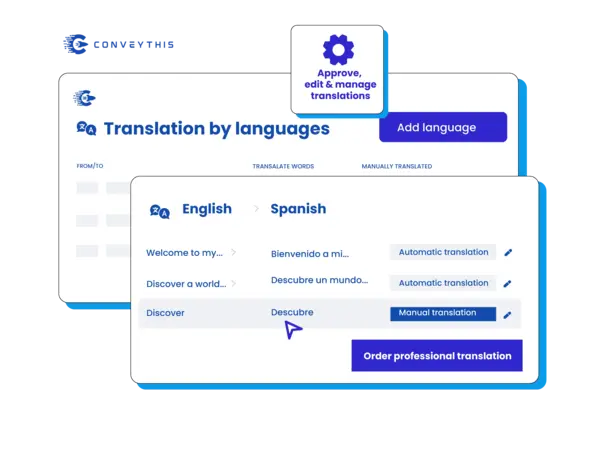
Traducción del servicio de asistencia técnica de expertos
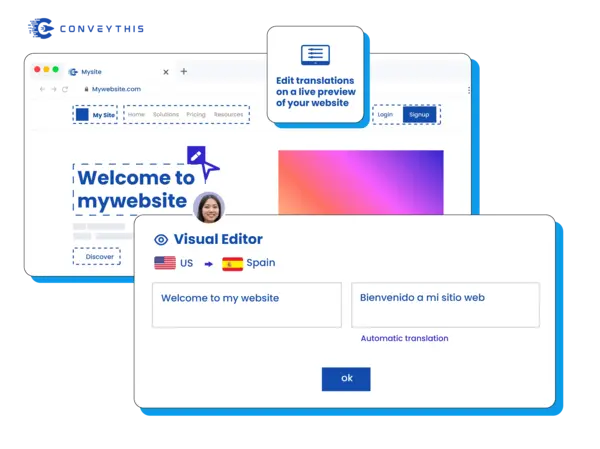
Ofrezca atención al cliente consistente en todos los idiomas con traducciones precisas de su contenido Zendesk. ConveyThis traduce artículos de ayuda, macros y respuestas automatizadas manteniendo la precisión técnica. Edite las traducciones directamente dentro de la vista previa de su centro de ayuda, garantizando que la información de soporte siga siendo clara y útil para los clientes en su idioma preferido.
Take Control total de tus traducciones
Gestión del flujo de trabajo de traducción
Coordine los esfuerzos de traducción en todo su equipo de atención al cliente de manera eficiente. ConveyThis proporciona herramientas de colaboración para administrar contenido de ayuda multilingüe, lo que permite a los gerentes de soporte asignar tareas de traducción y mantener la coherencia entre los artículos. Realice un seguimiento del progreso de la traducción de toda su base de conocimientos y asegúrese de que todo el contenido orientado al cliente se mantenga actualizado en todos los idiomas.
Conectar con audiencias globales auténticamente

Solución de localización completa Zendesk
Localice todo su centro de ayuda Zendesk y portal de clientes para mercados internacionales. ConveyThis maneja artículos de ayuda, formularios de contacto, widgets de soporte y mensajes orientados al cliente durante toda la experiencia de soporte. Cree una experiencia de soporte nativa para clientes en diferentes regiones, reduciendo las barreras lingüísticas que a menudo generan clientes frustrados y tiempos de resolución más largos.
Fácilmente gestiona tus traducciones
Implementación ultrarrápida
Experimente una configuración sin esfuerzo con nuestro proceso de integración optimizado. Implemente capacidades de soporte multilingüe en cuestión de minutos utilizando nuestro intuitivo sistema de configuración. Acceda a 200+ opciones de idioma sin ningún requisito de codificación, lo que garantiza que su centro de ayuda Zendesk logre una compatibilidad de traducción completa a través de nuestra solución de complementos optimizada.
Solución de traducción Premium Zendesk
Descubra la plataforma de traducción líder en la industria diseñada específicamente para entornos Zendesk. Nuestra solución integral ofrece una atención al cliente multilingüe superior a través de una interfaz intuitiva y un potente motor de traducción. Supere sin esfuerzo las barreras lingüísticas y al mismo tiempo garantice que el contenido de su centro de ayuda se conecte auténticamente con diversas audiencias globales.
Expansión global del alcance del cliente
Amplíe su influencia en la atención al cliente en los mercados internacionales con nuestras avanzadas capacidades de traducción Zendesk. Convierta sin problemas artículos de ayuda, preguntas frecuentes y documentación de soporte a varios idiomas, haciendo que su servicio al cliente sea accesible y atractivo para audiencias de todo el mundo que buscan ayuda en su idioma preferido.
Por qué elegir ConveyThis para Zendesk
Un tablero
Administre cadenas, medios, SEO y contenido de aplicaciones en un solo espacio de trabajo.
Glosario y reglas
Bloquee los términos de marca y los nombres de productos para mantener la coherencia de las traducciones.
SEO multilingüe
Hreflang automático, metadatos localizados y URL limpias específicas del idioma.
Editor visual
Traducir en contexto — editar directamente en la página y obtener una vista previa por configuración regional.
Traducción automática
Comience rápidamente con traducciones automáticas, perfeccione las reglas y los recuerdos de la marca.
Estructura del sitio multilingüe
Sirva locales en subdirectorios/subdominios compatibles con SEO con un conmutador accesible.
Redirección automática de visitantes
Opcionalmente, dirija a los visitantes al idioma de su navegador para reducir el rebote.
Aprender cómo empezar
¡Descubre cómo hacer que tu sitio web sea multilingüe y observa cómo crece!
Integre ConveyThis con su Zendesk siguiendo los siguientes sencillos pasos:
Crear cuenta ConveyThis
Instale el complemento ConveyThis
Configurar la configuración del idioma
Gestionar y optimizar
Zendesk help center translation: common questions
How is this different from Zendesk's translated articles and dynamic content?
Where does the snippet go in my Zendesk theme?
document_head.hbs under Templates, paste the snippet and publish. The Zendesk setup guide shows each step.Do new and updated help center articles get translated?
Will translated help center pages get separate URLs for Google?
yourcompany.zendesk.com ConveyThis runs in its default mode. For language sub-domains, the help center needs a custom domain whose DNS you control; Zendesk calls this host mapping and uses a CNAME record for an address such as support.yourcompany.com. With that set up, sub-domains with hreflang tags are available on the Business plan or higher. Read the sub-domain setup steps.Can I leave some help center sections in English?
conveythis-no-translate class to a single element. Both are described in excluding pages and elements.¿Tienes una pregunta diferente?
Comuníquese con nuestro equipo de soporte dedicado — estamos aquí para ayudarlo, en varios idiomas