



Choose WPML if you want every translation stored inside WordPress and you are comfortable configuring it yourself. Choose Weglot if you want a hosted service with a long list of platform integrations and a 14-day trial. Choose ConveyThis if you want a hosted service with more words per dollar at each comparable tier, a free plan to test with, and the same setup on WordPress and other platforms. All three can produce SEO-friendly language URLs with hreflang.
Competitor facts in this article were checked on the vendors’ own pricing and feature pages in September 2026 (Weglot pricing, WPML purchase page, WPML features). Prices change, so check the vendor’s page before you buy.
Key takeaways
- WPML is a WordPress plugin sold per year: €39 (1 site, no AI translation included), €99 (3 sites, 22,500 AI words) or €199 (unlimited sites, 45,000 AI words). There is no free plan, and refunds are available for 30 days.
- Weglot is a hosted service from $17/month (10,000 words, 1 language) up to $769/month (5,000,000 words, 20 languages, 20 websites), with a Free plan of 2,000 words and a 14-day trial. Plans also include a monthly request (page view) allowance.
- ConveyThis is a hosted service from $12/month (30,000 words, 1 language). Its Free plan has 5,000 words and 1 language, and there is no timed trial of paid plans.
- At the Business tier with 3 languages, Weglot lists 50,000 words for $32/month and ConveyThis lists 100,000 words for $24/month. At the Pro tier (5 languages, 3 websites), Weglot lists 200,000 words for $87 and ConveyThis 400,000 words for $64.
- All three cover the basics of multilingual SEO. They differ in where translations live, how much setup you do yourself, and how well the plan limits fit your site.
How each tool works
WPML is installed inside WordPress. Translations are stored in your WordPress site alongside the original content, and you configure languages, URL formats and which content types are translatable in the WordPress admin. It works only on WordPress. WPML’s site says it supports WordPress 6.0 to 7.0 and is used on more than 1.5 million sites. Automatic translation is available, with a word allowance included in the CMS and Agency plans.
Weglot is a hosted translation service. You connect your site (on WordPress, through a plugin). Weglot then detects and translates the content, stores the translations in its cloud, and serves the language versions on subdirectories or subdomains. Weglot says it integrates with 70+ platforms and offers “over 110” languages and dialects.
ConveyThis is also a hosted service. On WordPress you install the ConveyThis plugin (1,000+ active installs on WordPress.org, rated 4.4/5 from 145 ratings), paste your API key, choose languages, and the site is translated and served on language-specific URLs. It supports 210 languages and has integration guides for 35 platforms, so the same account and workflow cover WordPress, Shopify, Webflow, Wix and custom sites.
Pricing compared
Entry and mid tiers (monthly prices, USD unless noted)
| WPML | Weglot | ConveyThis | |
|---|---|---|---|
| Free option | None (30-day refund) | Free: 2,000 words, 1 language, 1 site | Free: 5,000 words, 1 language, 1 site |
| Trial | None | 14 days | None (permanent Free plan instead) |
| Entry paid plan | Blog: €39/year, 1 site, no AI words | Starter: $17/mo, 10,000 words, 1 language | Starter: $12/mo, 30,000 words, 1 language |
| 3 languages | CMS: €99/year, 3 sites, 22,500 AI words | Business: $32/mo, 50,000 words | Business: $24/mo, 100,000 words |
| 5 languages, 3 sites | CMS covers 3 sites | Pro: $87/mo, 200,000 words | Pro: $64/mo, 400,000 words |
| Around 1M words | Buy extra AI words | Advanced: $329/mo, 1M words, 10 languages, 10 sites | Optimum: $160/mo, 1M words, 14 languages, 10 sites |
| Larger | Agency: €199/year, unlimited sites, 45,000 AI words | Extended: $769/mo, 5M words, 20 languages, 20 sites | Advanced: $480/mo, 4M words, 40 languages, 25 sites |
Yearly billing: Weglot’s annual prices are 10 times the monthly price, and so are ConveyThis’s. WPML is sold only per year.
How the limits work
Each tool caps something, so compare the limits that matter for your site:
- WPML limits the number of production sites per plan (1, 3 or unlimited) and the number of AI-translated words included in the price (none, 22,500 or 45,000).
- Weglot plans list a word allowance, a number of languages, a number of websites, and a monthly request (page view) allowance. According to its pricing page, when you exceed your limit Weglot emails you, and unless auto-upgrade is on, “translations will be discontinued until you upgrade your plan or delete the extra translations.”
- ConveyThis plans list a word allowance, a number of languages and a number of websites. Words are counted only when translated content is shown to a visitor, and bot traffic does not count.
To compare them in practice, count the words on your site (100 pages of 500 words is about 50,000), multiply by the number of languages, and see which plan in each tool covers that total with room to grow.
Features compared
| Feature | WPML | Weglot | ConveyThis |
|---|---|---|---|
| Where translations are stored | In your WordPress site | Weglot’s cloud | ConveyThis’s cloud |
| Platforms | WordPress only | 70+ platforms (per Weglot) | 35 integration guides, plus any site via JavaScript |
| Languages | 2,500+ language pairs, custom variants | 110+ languages and dialects | 210 languages |
| Automatic translation | Yes; AI words included in CMS and Agency | Yes | Yes |
| In-context editing | Advanced translation editor (CMS and Agency) | Visual editor | Visual editor |
| URL options | Folders, subdomains, domains per language, or language parameter | Subdirectories or subdomains; custom top-level domains on Extended and Enterprise | Subfolders, subdomains, ?lang; second-level domains on Extreme |
| Translated URL slugs | Yes | Pro plan and above | Business plan and above, on WordPress or subdomain setups (help article) |
| Hreflang | Yes | Yes | Automatic |
| Translated meta titles and descriptions | Yes | Yes | Yes, plus JSON-LD |
| Collaboration | Assign translations to your team | Add teammates and your own translators; 5 to 50 team members depending on plan | Team roles |
ConveyThis also includes a glossary, translation memory, and CSV and TMX import for bringing existing translations from another tool. Weglot lists a glossary on all plans, including Free.
SEO: what matters in practice
All three tools can create a separate URL for each language and add hreflang tags. Those are the two things search engines need to index and rank translated pages. Where they differ is setup:
- WPML gives you the most control and the most settings. You choose the URL format, set translated slugs and metadata, and make sure your SEO plugin and theme are configured for multiple languages. Done carefully, the result is excellent. Done in a hurry, it can leave untranslated metadata or language versions missing from your sitemaps.
- Weglot sets up language URLs and hreflang automatically and translates metadata. Translated slugs require the Pro plan or higher.
- ConveyThis sets up language URLs and hreflang automatically, and it also translates page titles, meta descriptions and JSON-LD structured data. See multilingual SEO with ConveyThis for what is generated.
Whichever you choose, check the result the same way: open a translated page, view the source, confirm the hreflang links and translated <title>, and filter Search Console by the language folder a few weeks after launch. Our hreflang guide explains what correct tags look like.
Where each tool is the better choice
Choose WPML when:
- You want translations stored in your own WordPress database, with no external service involved in serving pages.
- You have a developer or are comfortable configuring plugins, custom fields and page builders yourself.
- You run many WordPress sites and translate mostly by hand or with your own translators (the Agency plan covers unlimited sites for a yearly fee).
Choose Weglot when:
- You want a hosted service with a long list of platform integrations and a 14-day trial before paying.
- You want media translation (included from Weglot’s Business plan) and translated slugs managed from the same dashboard (Pro plan and above).
- Your site is small enough to sit comfortably inside its word and page-view allowances.
Choose ConveyThis when:
- You want a hosted service and more words per dollar at comparable tiers (for example 100,000 vs 50,000 words at the 3-language tier).
- You want to try it free with one language and 5,000 words, with no card and no time limit.
- You run sites on more than one platform and want one workflow, or you are moving from another service and want to bring translations with you via CSV or TMX import (see switching from Weglot).
Setting up ConveyThis on WordPress
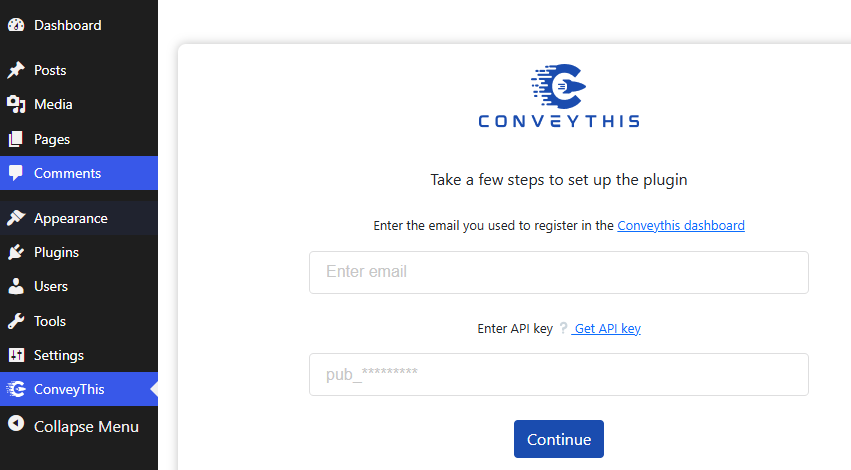
- Install ConveyThis Translate from the WordPress plugin directory, or search for it under Plugins > Add New.
- Create a ConveyThis account and copy your API key from the dashboard.
- In WordPress, open the ConveyThis settings and paste the API key.
- Select your site’s original language and the languages you want to add.
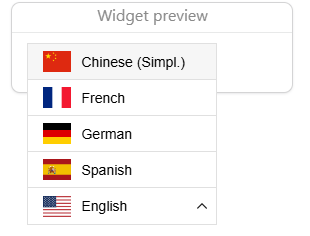
- Save. A language switcher appears on the front end and your translated pages are live.
Then review your most important pages in the visual editor, add brand terms to the glossary, and check the translated titles on your top landing pages. The WordPress translation guide in our help center covers each setting.
Frequently asked questions
Is Weglot or WPML better for SEO? Both can produce SEO-friendly language URLs with hreflang. WPML gives you more manual control inside WordPress. Weglot automates more of the setup but keeps translated slugs for its Pro plan and above. The better choice is the one you will actually configure and maintain correctly.
Does WPML have a free version? No. WPML’s plans start at €39 per year, with a 30-day refund window. There is no free plan.
Does Weglot have a free plan? Yes. Weglot’s Free plan includes 2,000 words, one translated language and one website, and paid plans have a 14-day trial.
Can I switch from Weglot or WPML to ConveyThis without losing translations? Yes. Export your translations from the old tool and import them into ConveyThis with CSV or TMX import, then review the pages that matter most in the visual editor.
Which is cheapest for a small WordPress site? For a site that needs one extra language and fewer than 5,000 words, the free plans of Weglot (2,000 words) or ConveyThis (5,000 words) cost nothing. Beyond that, multiply your word count by your number of languages and compare the plans that cover the total. ConveyThis pricing lists every tier.
To see how your own site looks translated, start with ConveyThis for free.












;fill-opacity:1;'%20d='M%2019.511719%2039.964844%20C%208.304688%2039.964844%200%2031.289062%200%2020.324219%20L%200%2020.230469%20C%200%209.363281%208.160156%200.46875%2019.847656%200.46875%20C%2027.023438%200.46875%2031.320312%202.878906%2034.847656%206.375%20L%2029.519531%2012.492188%20C%2026.59375%209.820312%2023.59375%208.179688%2019.800781%208.179688%20C%2013.390625%208.179688%208.761719%2013.53125%208.761719%2020.085938%20L%208.761719%2020.203125%20C%208.761719%2026.757812%2013.273438%2032.203125%2019.800781%2032.203125%20C%2024.144531%2032.203125%2026.808594%2030.46875%2029.808594%2027.722656%20L%2035.136719%2033.121094%20C%2031.199219%2037.335938%2026.855469%2039.964844%2019.511719%2039.964844%20'/%3e%3cpath%20style='%20stroke:none;fill-rule:nonzero;fill:rgb(26.274511%25,42.352942%25,94.901961%25);fill-opacity:1;'%20d='M%2035.878906%200.0351562%20L%2044.136719%200.0351562%20L%2044.136719%2039.867188%20L%2035.878906%2039.867188%20Z%20M%2035.878906%200.0351562%20'/%3e%3cpath%20style='%20stroke:none;fill-rule:nonzero;fill:rgb(26.274511%25,42.352942%25,94.901961%25);fill-opacity:1;'%20d='M%2059.472656%2016.15625%20C%2056.039062%2016.15625%2053.808594%2018.613281%2053.160156%2022.375%20L%2065.617188%2022.375%20C%2065.113281%2018.664062%2062.953125%2016.15625%2059.472656%2016.15625%20M%2073.535156%2027.578125%20L%2053.28125%2027.578125%20C%2054.097656%2031.335938%2056.710938%2033.3125%2060.40625%2033.3125%20C%2063.191406%2033.3125%2065.183594%2032.445312%2067.464844%2030.300781%20L%2072.191406%2034.492188%20C%2069.480469%2037.867188%2065.566406%2039.941406%2060.289062%2039.941406%20C%2051.527344%2039.941406%2045.070312%2033.769531%2045.070312%2024.832031%20L%2045.070312%2024.710938%20C%2045.070312%2016.347656%2051%209.480469%2059.472656%209.480469%20C%2069.191406%209.480469%2073.65625%2017.074219%2073.65625%2025.363281%20L%2073.65625%2025.457031%20C%2073.65625%2026.300781%2073.609375%2026.808594%2073.535156%2027.578125%20'/%3e%3cpath%20style='%20stroke:none;fill-rule:nonzero;fill:rgb(26.274511%25,42.352942%25,94.901961%25);fill-opacity:1;'%20d='M%2089.375%2039.796875%20L%2081.863281%2039.796875%20L%2070.390625%2010.324219%20L%2079.152344%2010.324219%20L%2085.679688%2029.914062%20L%2092.257812%2010.324219%20L%20100.847656%2010.324219%20Z%20M%2089.375%2039.796875%20'/%3e%3cpath%20style='%20stroke:none;fill-rule:nonzero;fill:rgb(26.274511%25,42.352942%25,94.901961%25);fill-opacity:1;'%20d='M%20111.550781%2016.15625%20C%20108.121094%2016.15625%20105.886719%2018.613281%20105.238281%2022.375%20L%20117.695312%2022.375%20C%20117.191406%2018.664062%20115.03125%2016.15625%20111.550781%2016.15625%20M%20125.617188%2027.578125%20L%20105.359375%2027.578125%20C%20106.175781%2031.335938%20108.792969%2033.3125%20112.488281%2033.3125%20C%20115.246094%2033.3125%20117.265625%2032.445312%20119.542969%2030.300781%20L%20124.273438%2034.492188%20C%20121.558594%2037.867188%20117.648438%2039.941406%20112.367188%2039.941406%20C%20103.609375%2039.941406%2097.152344%2033.769531%2097.152344%2024.832031%20L%2097.152344%2024.710938%20C%2097.152344%2016.347656%20103.078125%209.480469%20111.550781%209.480469%20C%20121.273438%209.480469%20125.734375%2017.074219%20125.734375%2025.363281%20L%20125.734375%2025.457031%20C%20125.734375%2026.300781%20125.6875%2026.808594%20125.617188%2027.578125%20'/%3e%3cpath%20style='%20stroke:none;fill-rule:nonzero;fill:rgb(26.274511%25,42.352942%25,94.901961%25);fill-opacity:1;'%20d='M%20143.566406%2018.757812%20C%20138.070312%2018.757812%20134.710938%2022.085938%20134.710938%2029.074219%20L%20134.710938%2039.867188%20L%20126.457031%2039.867188%20L%20126.457031%2010.613281%20L%20134.710938%2010.613281%20L%20134.710938%2016.519531%20C%20136.390625%2012.46875%20139.128906%209.867188%20144%2010.085938%20L%20144%2018.757812%20Z%20M%20143.566406%2018.757812%20'/%3e%3c/g%3e%3c/svg%3e)




;fill-opacity:1;'%20d='M%20144.558594%2039.894531%20L%20155.4375%209.839844%20C%20155.4375%209.839844%20147.28125%209.839844%20139.121094%2011.515625%20L%20128.867188%2039.894531%20Z%20M%20142.675781%201.78125%20L%20140.585938%207.539062%20C%20148.738281%205.863281%20156.902344%205.863281%20156.902344%205.863281%20L%20158.992188%200.105469%20C%20158.992188%200.105469%20150.832031%200.105469%20142.675781%201.78125%20M%2085.980469%2032.773438%20C%2090.898438%2033.71875%2095.914062%2034.136719%20101.039062%2034.136719%20C%20106.375%2034.136719%20110.140625%2032.984375%20110.554688%2029.320312%20C%20110.765625%2027.640625%20109.089844%2026.382812%20106.167969%2024.707031%20C%20102.816406%2022.824219%2099.894531%2021.878906%2096.960938%2019.886719%20C%2094.03125%2017.898438%2092.78125%2014.859375%2093.71875%2011.507812%20C%2094.871094%207.636719%2097.585938%205.4375%20101.664062%203.34375%20C%20106.480469%200.9375%20110.242188%20-0.0078125%20119.550781%20-0.0078125%20C%20125.40625%20-0.0078125%20131.054688%200.515625%20136.597656%201.667969%20L%20134.609375%207.113281%20C%20129.691406%206.167969%20124.675781%205.75%20119.550781%205.75%20C%20114.214844%205.75%20110.453125%206.90625%20110.035156%2010.570312%20C%20109.828125%2012.246094%20111.5%2013.503906%20114.425781%2015.179688%20C%20117.773438%2017.066406%20120.695312%2018.011719%20123.628906%2020%20C%20126.558594%2021.988281%20127.808594%2025.027344%20126.871094%2028.378906%20C%20125.71875%2032.253906%20123.003906%2034.449219%20118.925781%2036.542969%20C%20114.113281%2038.949219%20110.347656%2039.894531%20101.039062%2039.894531%20C%2095.183594%2039.894531%2089.535156%2039.375%2083.992188%2038.21875%20Z%20M%2062.34375%2039.894531%20L%2071.441406%2014.867188%20C%2074.476562%206.488281%2063.390625%209.527344%2060.875%2011.515625%20C%2058.890625%2012.984375%2055.332031%2016.441406%2054.078125%2020.105469%20L%2046.859375%2040%20L%2031.175781%2040%20L%2040.273438%2014.867188%20C%2043.308594%206.488281%2032.222656%209.527344%2029.710938%2011.515625%20C%2027.722656%2012.984375%2024.167969%2016.441406%2022.910156%2020.105469%20L%2015.691406%2040%20L%200.0078125%2040%20L%2014.441406%200.105469%20C%2019.464844%200.105469%2022.179688%201.257812%2024.375%203.457031%20C%2025.207031%204.289062%2025.734375%205.339844%2026.046875%206.496094%20C%2028.980469%204.714844%2031.589844%203.351562%2033.371094%202.726562%20C%2036.613281%201.46875%2040.691406%200.105469%2045.714844%200.105469%20C%2050.734375%200.105469%2053.453125%201.257812%2055.644531%203.457031%20C%2056.480469%204.289062%2057.007812%205.339844%2057.320312%206.496094%20C%2060.25%204.714844%2062.863281%203.351562%2064.640625%202.726562%20C%2067.886719%201.46875%2071.964844%200.113281%2076.984375%200.113281%20C%2082.007812%200.113281%2084.722656%201.265625%2086.917969%203.464844%20C%2089.21875%205.660156%2089.113281%209.742188%2088.28125%2012.050781%20L%2078.027344%2039.902344%20L%2062.34375%2039.902344%20Z%20M%2062.34375%2039.894531%20'/%3e%3c/g%3e%3c/svg%3e)

;fill-opacity:1;'%20d='M%202.453125%209.882812%20L%202.453125%2012.851562%20L%207.304688%2012.851562%20L%2016.800781%2030.734375%20L%2028.488281%2030.734375%20L%2037.980469%2012.824219%20L%2042.832031%2012.792969%20L%2042.84375%209.882812%20L%2028.328125%209.882812%20L%2028.328125%2012.804688%20L%2032.195312%2012.804688%20L%2025.488281%2025.515625%20L%2018.234375%2012.847656%20L%2023.527344%2012.824219%20L%2023.515625%209.882812%20Z%20M%2096.097656%209.882812%20L%2096.097656%2012.851562%20L%20100.949219%2012.851562%20L%20110.445312%2030.734375%20L%20122.128906%2030.734375%20L%20131.625%2012.824219%20L%20136.476562%2012.792969%20L%20136.484375%209.882812%20L%20121.972656%209.882812%20L%20121.972656%2012.804688%20L%20125.835938%2012.804688%20L%20119.132812%2025.515625%20L%20111.878906%2012.847656%20L%20117.167969%2012.824219%20L%20117.160156%209.882812%20Z%20M%2072.222656%209.882812%20L%2072.222656%2012.851562%20L%2077.078125%2012.851562%20L%2077.082031%2027.453125%20L%2071.96875%2027.453125%20L%2071.96875%2030.707031%20L%2077.085938%2030.734375%20L%20101.3125%2030.734375%20L%20101.3125%2021.027344%20L%2098.15625%2021.027344%20C%2097.984375%2026.167969%2093.542969%2027.457031%2091.675781%2027.457031%20C%2089.960938%2027.457031%2086.640625%2027.453125%2086.640625%2027.453125%20L%2086.640625%2012.847656%20L%2091.417969%2012.824219%20L%2091.410156%209.882812%20Z%20M%2055.890625%209.285156%20C%2047.644531%209.285156%2040.960938%2014.214844%2040.960938%2020.292969%20C%2040.960938%2026.375%2047.644531%2031.304688%2055.890625%2031.304688%20C%2064.136719%2031.304688%2070.824219%2026.375%2070.824219%2020.292969%20C%2070.824219%2014.214844%2064.136719%209.285156%2055.890625%209.285156%20Z%20M%2055.675781%2028.0625%20C%2052.769531%2028.0625%2050.414062%2024.566406%2050.414062%2020.25%20C%2050.414062%2015.933594%2052.769531%2012.4375%2055.675781%2012.4375%20C%2058.582031%2012.4375%2060.941406%2015.933594%2060.941406%2020.25%20C%2060.941406%2024.566406%2058.582031%2028.0625%2055.675781%2028.0625%20Z%20M%20149.539062%208.921875%20C%20141.289062%208.921875%20134.605469%2013.933594%20134.605469%2020.113281%20C%20134.605469%2026.292969%20141.289062%2031.300781%20149.539062%2031.300781%20C%20157.78125%2031.300781%20164.46875%2026.292969%20164.46875%2020.113281%20C%20164.46875%2013.933594%20157.78125%208.921875%20149.539062%208.921875%20Z%20M%20149.324219%2028.007812%20C%20146.417969%2028.007812%20144.0625%2024.453125%20144.0625%2020.066406%20C%20144.0625%2015.679688%20146.417969%2012.125%20149.324219%2012.125%20C%20152.230469%2012.125%20154.585938%2015.679688%20154.585938%2020.066406%20C%20154.585938%2024.453125%20152.230469%2028.007812%20149.324219%2028.007812%20Z%20M%20149.324219%2028.007812%20'/%3e%3c/g%3e%3c/svg%3e)





