



Cloudflare O2O (Orange-to-Orange) is a routing setup where a request passes through two Cloudflare zones: your zone first, then the zone of a SaaS provider you point to. You turn it on by adding a Proxied (orange-cloud) CNAME record that targets the provider’s hostname. Cloudflare applies your zone’s settings first and the provider’s second, so your WAF and rules keep working.
ConveyThis uses O2O to serve translated pages for sites that are already on Cloudflare, without a nameserver change. This guide explains how O2O works, how to set it up with ConveyThis step by step, and what to check when it doesn’t behave.
Key takeaways
- O2O applies only when you point a Proxied CNAME at a Cloudflare for SaaS provider, and only when the two zones belong to different Cloudflare accounts.
- Your zone’s settings run first. Security rules, bot settings and page rules you already have still see the request.
- A grey-cloud (DNS only) record or an A record does not take the O2O path.
- With ConveyThis, you add Proxied CNAMEs to
fallback.conveythis.net, wait for the certificates to turn Active, and translated pages are served by a Cloudflare Worker at the edge. - O2O is optional. The standard ConveyThis DNS setup stays available.
What Cloudflare O2O is, in plain terms
Many SaaS products (site builders, e-commerce platforms, translation proxies) run on Cloudflare for SaaS. Their customers connect a custom domain by adding a CNAME record that points at the provider.
If that customer’s domain is also on Cloudflare, the request meets two Cloudflare zones on its way to the page. Cloudflare’s O2O documentation defines this as “a specific traffic routing configuration where traffic routes through two Cloudflare zones: the first Cloudflare zone is owned by customer 1 and the second Cloudflare zone is owned by customer 2, who is considered a SaaS provider.”
Three facts from that page decide whether O2O applies to you:
- Record type. You need “a proxied DNS record matching the custom hostname with a CNAME target defined by the SaaS Provider.”
- Order. “The settings configured in your Cloudflare zone will be applied to the traffic first, and then the settings configured in the SaaS provider’s zone will be applied to the traffic second.”
- Accounts. “O2O only applies when the two zones are part of different Cloudflare accounts.” It also “does not apply when an A record is used.”
The provider can see that a request came through O2O: Cloudflare adds the header cf-connecting-o2o: 1 in the provider’s zone.
Why O2O matters for website translation
A translation proxy has to sit between the visitor and your site so it can return translated HTML. The classic way is to point DNS for the translated hostnames at the proxy.
That’s awkward when your domain already lives on Cloudflare. Your team relies on the zone’s TLS, WAF and caching, and nobody wants to move DNS or turn off the orange cloud just to add languages. O2O avoids that trade-off: the request enters your zone as usual, then continues to ConveyThis’s Cloudflare for SaaS zone, where a Worker produces the translated page.
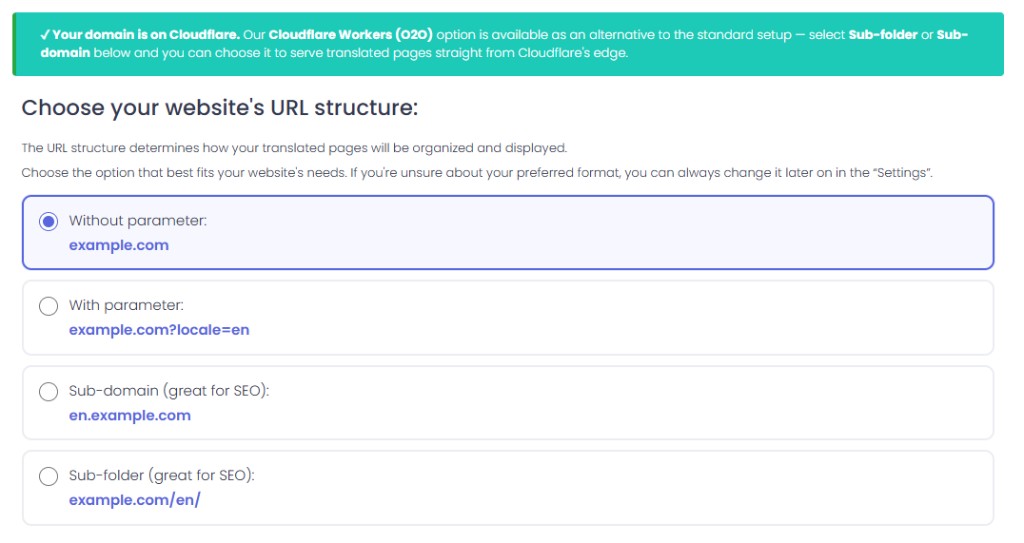
ConveyThis detects that the domain is on Cloudflare and offers the Workers (O2O) option.
Before you start
- Your domain’s nameservers are Cloudflare’s, and you can edit its DNS records.
- You have a ConveyThis account with the domain added. The sub-folder and sub-domain URL structures are available on the Business plan and above (pricing).
- You know which URL structure you want. Sub-folder gives
example.com/de/, sub-domain givesde.example.com. Our comparison of subdirectories vs. subdomains for multilingual SEO covers the SEO side, and the help article on sub-domain vs. sub-directory covers platform limits.
How to set up ConveyThis Cloudflare Workers (O2O)
Step 1: Add the domain and confirm the Cloudflare detection
When you add the domain, ConveyThis checks its nameservers. If they belong to Cloudflare, setup shows a notice that the domain is on Cloudflare and unlocks Cloudflare Workers (O2O) for the sub-folder and sub-domain structures.
Step 2: Choose the URL structure and switch the serve method to O2O
Pick Sub-folder or Sub-domain, then choose Cloudflare Workers (O2O) as the serve method. The standard DNS proxy remains available on the same screen if you’d rather use it.
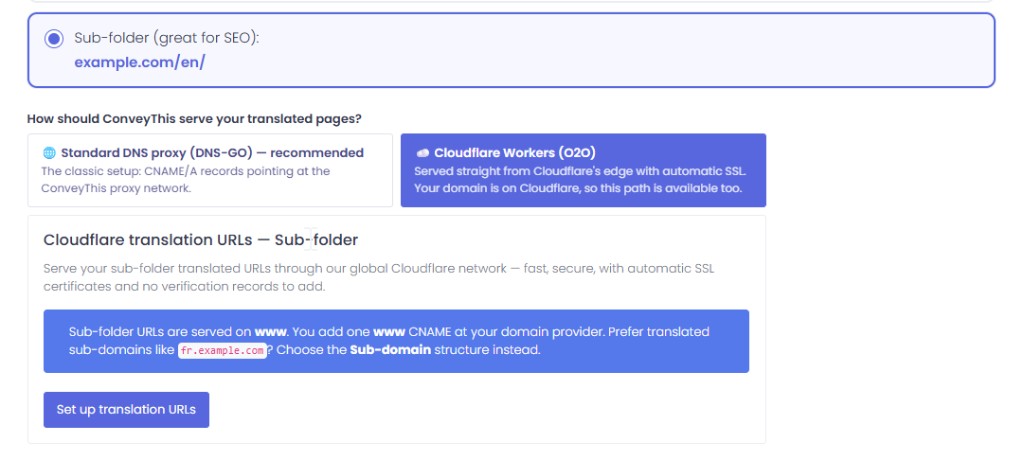
Standard DNS proxy stays available. O2O is the Cloudflare-native option when the zone is detected.
Step 3: Add the Proxied CNAME records in Cloudflare
ConveyThis prints the exact records for your domain. They point at fallback.conveythis.net:
- Sub-folder: typically
@andwww, plus an origin record when your setup needs one. - Sub-domain: one record per language host (for example
de,fr), plus anoriginrecord so the Worker can reach your real site without looping back through itself.
Add them in your Cloudflare DNS dashboard and leave the cloud orange on every record. This is the one rule you can’t bend: a DNS-only record doesn’t route through O2O.
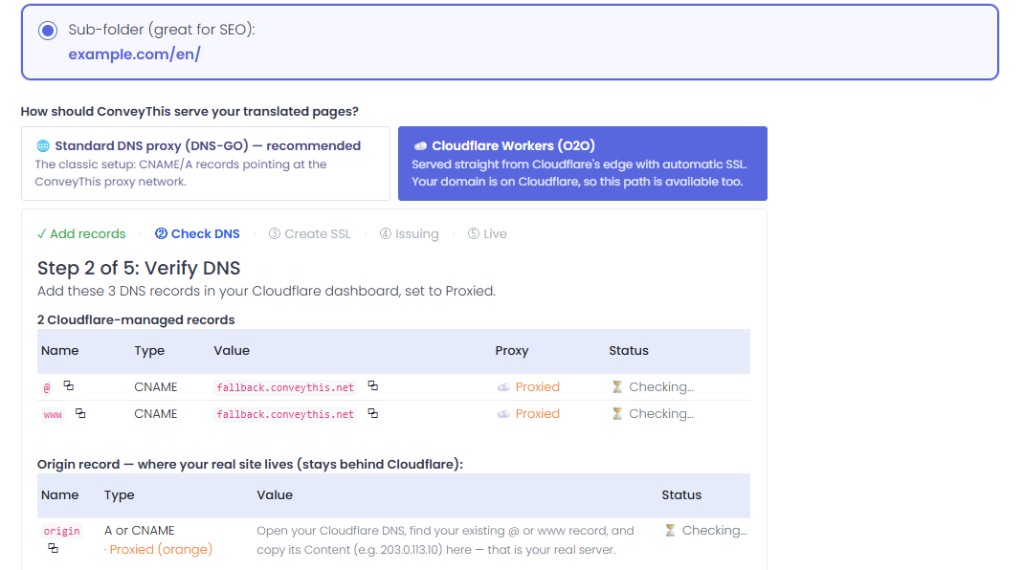
Verify DNS: Proxied @ / www toward fallback.conveythis.net, plus the origin record for the real server.
Step 4: Wait for SSL to turn Active
Cloudflare for SaaS issues the certificates for your hostnames. ConveyThis uses HTTP validation, so you don’t add validation (TXT) records or upload anything to your server. Refresh the status table until every certificate shows Active. In our test run this took a few minutes.
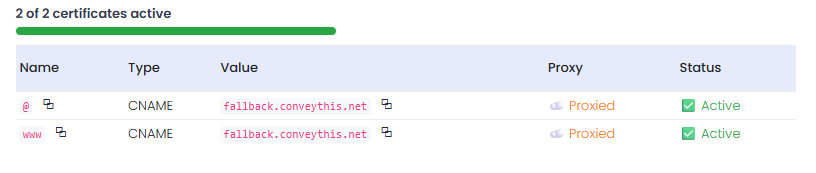
When status is Active, the translated hostnames are ready.
Step 5: Open a translated URL
Load a translated page, such as example.com/de/ or de.example.com. You should see your normal layout with translated text and the language switcher.

A translated page served through Cloudflare Workers (O2O).
What happens to each request
Here is the path a visitor’s request takes, based on how the ConveyThis edge Worker is built:
- The visitor requests a translated URL. The request enters your Cloudflare zone, and your rules apply.
- The Proxied CNAME hands it to ConveyThis’s Cloudflare for SaaS zone (O2O).
- The Worker looks up your domain’s settings, works out the target language from the sub-folder or sub-domain, and fetches the original page from your origin.
- As the HTML streams through, the Worker swaps in translations from a stored dictionary for your site. It also points internal links, the canonical tag and
og:urlat the same language version, and sets the page’slangattribute. - The translated page goes back to the visitor. Text that has no translation yet is sent for translation in the background, so it appears in the dictionary for the next view.
Some details worth knowing:
- Caching. Translated pages are cached at the edge. The cache key includes a fingerprint of your translations, so when you edit a translation, the next request gets a fresh page without a manual purge.
- Logged-in visitors. Requests that carry cookies skip the shared page cache, so one visitor never sees another visitor’s personalized page.
- Excluded content. Text inside
script,style,code,preandtextareais never translated, and neither is anything markedtranslate="no". - Loop protection. If a misconfigured record sends the Worker’s own request back to itself, it stops with an error instead of looping.
Troubleshooting
The translated URL doesn’t load or shows your original site. Check that every routing record is still Proxied. Someone switching a record to DNS only “for debugging” is the most common cause.
Certificates stay on “Issuing”. Give it a little longer and re-check. Don’t switch records to grey cloud to speed things up. O2O needs them Proxied, so you’d only create a second problem to undo.
Error about a loop, or pages that never finish loading. The Worker can’t reach your real site. Make sure the origin record ConveyThis listed exists, is correct, and points at your actual server or platform.
Your own firewall blocks the translated pages. Because your zone runs first, a strict WAF rule or bot setting can block requests before they reach ConveyThis. Check your security events for the translated hostnames.
Some text stays in the original language. If it’s brand-new text, reload after a moment. If it persists, check whether the element has translate="no", or edit the translation in your ConveyThis dashboard.
Should you use O2O or the standard DNS setup?
Use Cloudflare Workers (O2O) if your domain already uses Cloudflare nameservers and you want to keep your zone’s security and control while adding translated sub-folder or sub-domain URLs.
Use the standard DNS setup if your domain isn’t on Cloudflare, or if you’d rather not manage Proxied records in the Cloudflare dashboard. For non-Cloudflare domains, follow the CNAME setup guide.
Either way, check a translated page after setup with “View source”: the lang attribute and the canonical should match the translated URL, and if you rely on hreflang, confirm every language version is listed. The multilingual SEO features page explains what ConveyThis adds for search engines.
FAQ
What does O2O stand for in Cloudflare? Orange-to-Orange: traffic that passes through two Cloudflare zones, yours and a SaaS provider’s, via a Proxied CNAME.
Do I need to change my nameservers for ConveyThis O2O? No. O2O is for domains that are already on Cloudflare. You only add Proxied CNAME records in your existing zone.
Does O2O work with an A record? No. Cloudflare’s documentation says O2O “does not apply when an A record is used.” Use the CNAME records ConveyThis shows you.
Do my Cloudflare WAF and page rules still apply? Yes. Your zone processes the request first, then the provider’s zone.
Can I switch back to the standard DNS proxy? Yes. O2O is opt-in and you can change the serve method in your domain’s URL settings.
Do I need a CMS plugin? No. The Worker translates the HTML your site already sends, so it works regardless of how the site is built.
Already on Cloudflare? Create a ConveyThis account, add your domain and choose Cloudflare Workers (O2O) on the URL structure step.












;fill-opacity:1;'%20d='M%2019.511719%2039.964844%20C%208.304688%2039.964844%200%2031.289062%200%2020.324219%20L%200%2020.230469%20C%200%209.363281%208.160156%200.46875%2019.847656%200.46875%20C%2027.023438%200.46875%2031.320312%202.878906%2034.847656%206.375%20L%2029.519531%2012.492188%20C%2026.59375%209.820312%2023.59375%208.179688%2019.800781%208.179688%20C%2013.390625%208.179688%208.761719%2013.53125%208.761719%2020.085938%20L%208.761719%2020.203125%20C%208.761719%2026.757812%2013.273438%2032.203125%2019.800781%2032.203125%20C%2024.144531%2032.203125%2026.808594%2030.46875%2029.808594%2027.722656%20L%2035.136719%2033.121094%20C%2031.199219%2037.335938%2026.855469%2039.964844%2019.511719%2039.964844%20'/%3e%3cpath%20style='%20stroke:none;fill-rule:nonzero;fill:rgb(26.274511%25,42.352942%25,94.901961%25);fill-opacity:1;'%20d='M%2035.878906%200.0351562%20L%2044.136719%200.0351562%20L%2044.136719%2039.867188%20L%2035.878906%2039.867188%20Z%20M%2035.878906%200.0351562%20'/%3e%3cpath%20style='%20stroke:none;fill-rule:nonzero;fill:rgb(26.274511%25,42.352942%25,94.901961%25);fill-opacity:1;'%20d='M%2059.472656%2016.15625%20C%2056.039062%2016.15625%2053.808594%2018.613281%2053.160156%2022.375%20L%2065.617188%2022.375%20C%2065.113281%2018.664062%2062.953125%2016.15625%2059.472656%2016.15625%20M%2073.535156%2027.578125%20L%2053.28125%2027.578125%20C%2054.097656%2031.335938%2056.710938%2033.3125%2060.40625%2033.3125%20C%2063.191406%2033.3125%2065.183594%2032.445312%2067.464844%2030.300781%20L%2072.191406%2034.492188%20C%2069.480469%2037.867188%2065.566406%2039.941406%2060.289062%2039.941406%20C%2051.527344%2039.941406%2045.070312%2033.769531%2045.070312%2024.832031%20L%2045.070312%2024.710938%20C%2045.070312%2016.347656%2051%209.480469%2059.472656%209.480469%20C%2069.191406%209.480469%2073.65625%2017.074219%2073.65625%2025.363281%20L%2073.65625%2025.457031%20C%2073.65625%2026.300781%2073.609375%2026.808594%2073.535156%2027.578125%20'/%3e%3cpath%20style='%20stroke:none;fill-rule:nonzero;fill:rgb(26.274511%25,42.352942%25,94.901961%25);fill-opacity:1;'%20d='M%2089.375%2039.796875%20L%2081.863281%2039.796875%20L%2070.390625%2010.324219%20L%2079.152344%2010.324219%20L%2085.679688%2029.914062%20L%2092.257812%2010.324219%20L%20100.847656%2010.324219%20Z%20M%2089.375%2039.796875%20'/%3e%3cpath%20style='%20stroke:none;fill-rule:nonzero;fill:rgb(26.274511%25,42.352942%25,94.901961%25);fill-opacity:1;'%20d='M%20111.550781%2016.15625%20C%20108.121094%2016.15625%20105.886719%2018.613281%20105.238281%2022.375%20L%20117.695312%2022.375%20C%20117.191406%2018.664062%20115.03125%2016.15625%20111.550781%2016.15625%20M%20125.617188%2027.578125%20L%20105.359375%2027.578125%20C%20106.175781%2031.335938%20108.792969%2033.3125%20112.488281%2033.3125%20C%20115.246094%2033.3125%20117.265625%2032.445312%20119.542969%2030.300781%20L%20124.273438%2034.492188%20C%20121.558594%2037.867188%20117.648438%2039.941406%20112.367188%2039.941406%20C%20103.609375%2039.941406%2097.152344%2033.769531%2097.152344%2024.832031%20L%2097.152344%2024.710938%20C%2097.152344%2016.347656%20103.078125%209.480469%20111.550781%209.480469%20C%20121.273438%209.480469%20125.734375%2017.074219%20125.734375%2025.363281%20L%20125.734375%2025.457031%20C%20125.734375%2026.300781%20125.6875%2026.808594%20125.617188%2027.578125%20'/%3e%3cpath%20style='%20stroke:none;fill-rule:nonzero;fill:rgb(26.274511%25,42.352942%25,94.901961%25);fill-opacity:1;'%20d='M%20143.566406%2018.757812%20C%20138.070312%2018.757812%20134.710938%2022.085938%20134.710938%2029.074219%20L%20134.710938%2039.867188%20L%20126.457031%2039.867188%20L%20126.457031%2010.613281%20L%20134.710938%2010.613281%20L%20134.710938%2016.519531%20C%20136.390625%2012.46875%20139.128906%209.867188%20144%2010.085938%20L%20144%2018.757812%20Z%20M%20143.566406%2018.757812%20'/%3e%3c/g%3e%3c/svg%3e)




;fill-opacity:1;'%20d='M%20144.558594%2039.894531%20L%20155.4375%209.839844%20C%20155.4375%209.839844%20147.28125%209.839844%20139.121094%2011.515625%20L%20128.867188%2039.894531%20Z%20M%20142.675781%201.78125%20L%20140.585938%207.539062%20C%20148.738281%205.863281%20156.902344%205.863281%20156.902344%205.863281%20L%20158.992188%200.105469%20C%20158.992188%200.105469%20150.832031%200.105469%20142.675781%201.78125%20M%2085.980469%2032.773438%20C%2090.898438%2033.71875%2095.914062%2034.136719%20101.039062%2034.136719%20C%20106.375%2034.136719%20110.140625%2032.984375%20110.554688%2029.320312%20C%20110.765625%2027.640625%20109.089844%2026.382812%20106.167969%2024.707031%20C%20102.816406%2022.824219%2099.894531%2021.878906%2096.960938%2019.886719%20C%2094.03125%2017.898438%2092.78125%2014.859375%2093.71875%2011.507812%20C%2094.871094%207.636719%2097.585938%205.4375%20101.664062%203.34375%20C%20106.480469%200.9375%20110.242188%20-0.0078125%20119.550781%20-0.0078125%20C%20125.40625%20-0.0078125%20131.054688%200.515625%20136.597656%201.667969%20L%20134.609375%207.113281%20C%20129.691406%206.167969%20124.675781%205.75%20119.550781%205.75%20C%20114.214844%205.75%20110.453125%206.90625%20110.035156%2010.570312%20C%20109.828125%2012.246094%20111.5%2013.503906%20114.425781%2015.179688%20C%20117.773438%2017.066406%20120.695312%2018.011719%20123.628906%2020%20C%20126.558594%2021.988281%20127.808594%2025.027344%20126.871094%2028.378906%20C%20125.71875%2032.253906%20123.003906%2034.449219%20118.925781%2036.542969%20C%20114.113281%2038.949219%20110.347656%2039.894531%20101.039062%2039.894531%20C%2095.183594%2039.894531%2089.535156%2039.375%2083.992188%2038.21875%20Z%20M%2062.34375%2039.894531%20L%2071.441406%2014.867188%20C%2074.476562%206.488281%2063.390625%209.527344%2060.875%2011.515625%20C%2058.890625%2012.984375%2055.332031%2016.441406%2054.078125%2020.105469%20L%2046.859375%2040%20L%2031.175781%2040%20L%2040.273438%2014.867188%20C%2043.308594%206.488281%2032.222656%209.527344%2029.710938%2011.515625%20C%2027.722656%2012.984375%2024.167969%2016.441406%2022.910156%2020.105469%20L%2015.691406%2040%20L%200.0078125%2040%20L%2014.441406%200.105469%20C%2019.464844%200.105469%2022.179688%201.257812%2024.375%203.457031%20C%2025.207031%204.289062%2025.734375%205.339844%2026.046875%206.496094%20C%2028.980469%204.714844%2031.589844%203.351562%2033.371094%202.726562%20C%2036.613281%201.46875%2040.691406%200.105469%2045.714844%200.105469%20C%2050.734375%200.105469%2053.453125%201.257812%2055.644531%203.457031%20C%2056.480469%204.289062%2057.007812%205.339844%2057.320312%206.496094%20C%2060.25%204.714844%2062.863281%203.351562%2064.640625%202.726562%20C%2067.886719%201.46875%2071.964844%200.113281%2076.984375%200.113281%20C%2082.007812%200.113281%2084.722656%201.265625%2086.917969%203.464844%20C%2089.21875%205.660156%2089.113281%209.742188%2088.28125%2012.050781%20L%2078.027344%2039.902344%20L%2062.34375%2039.902344%20Z%20M%2062.34375%2039.894531%20'/%3e%3c/g%3e%3c/svg%3e)

;fill-opacity:1;'%20d='M%202.453125%209.882812%20L%202.453125%2012.851562%20L%207.304688%2012.851562%20L%2016.800781%2030.734375%20L%2028.488281%2030.734375%20L%2037.980469%2012.824219%20L%2042.832031%2012.792969%20L%2042.84375%209.882812%20L%2028.328125%209.882812%20L%2028.328125%2012.804688%20L%2032.195312%2012.804688%20L%2025.488281%2025.515625%20L%2018.234375%2012.847656%20L%2023.527344%2012.824219%20L%2023.515625%209.882812%20Z%20M%2096.097656%209.882812%20L%2096.097656%2012.851562%20L%20100.949219%2012.851562%20L%20110.445312%2030.734375%20L%20122.128906%2030.734375%20L%20131.625%2012.824219%20L%20136.476562%2012.792969%20L%20136.484375%209.882812%20L%20121.972656%209.882812%20L%20121.972656%2012.804688%20L%20125.835938%2012.804688%20L%20119.132812%2025.515625%20L%20111.878906%2012.847656%20L%20117.167969%2012.824219%20L%20117.160156%209.882812%20Z%20M%2072.222656%209.882812%20L%2072.222656%2012.851562%20L%2077.078125%2012.851562%20L%2077.082031%2027.453125%20L%2071.96875%2027.453125%20L%2071.96875%2030.707031%20L%2077.085938%2030.734375%20L%20101.3125%2030.734375%20L%20101.3125%2021.027344%20L%2098.15625%2021.027344%20C%2097.984375%2026.167969%2093.542969%2027.457031%2091.675781%2027.457031%20C%2089.960938%2027.457031%2086.640625%2027.453125%2086.640625%2027.453125%20L%2086.640625%2012.847656%20L%2091.417969%2012.824219%20L%2091.410156%209.882812%20Z%20M%2055.890625%209.285156%20C%2047.644531%209.285156%2040.960938%2014.214844%2040.960938%2020.292969%20C%2040.960938%2026.375%2047.644531%2031.304688%2055.890625%2031.304688%20C%2064.136719%2031.304688%2070.824219%2026.375%2070.824219%2020.292969%20C%2070.824219%2014.214844%2064.136719%209.285156%2055.890625%209.285156%20Z%20M%2055.675781%2028.0625%20C%2052.769531%2028.0625%2050.414062%2024.566406%2050.414062%2020.25%20C%2050.414062%2015.933594%2052.769531%2012.4375%2055.675781%2012.4375%20C%2058.582031%2012.4375%2060.941406%2015.933594%2060.941406%2020.25%20C%2060.941406%2024.566406%2058.582031%2028.0625%2055.675781%2028.0625%20Z%20M%20149.539062%208.921875%20C%20141.289062%208.921875%20134.605469%2013.933594%20134.605469%2020.113281%20C%20134.605469%2026.292969%20141.289062%2031.300781%20149.539062%2031.300781%20C%20157.78125%2031.300781%20164.46875%2026.292969%20164.46875%2020.113281%20C%20164.46875%2013.933594%20157.78125%208.921875%20149.539062%208.921875%20Z%20M%20149.324219%2028.007812%20C%20146.417969%2028.007812%20144.0625%2024.453125%20144.0625%2020.066406%20C%20144.0625%2015.679688%20146.417969%2012.125%20149.324219%2012.125%20C%20152.230469%2012.125%20154.585938%2015.679688%20154.585938%2020.066406%20C%20154.585938%2024.453125%20152.230469%2028.007812%20149.324219%2028.007812%20Z%20M%20149.324219%2028.007812%20'/%3e%3c/g%3e%3c/svg%3e)





