
Elementor Integración
Sin datos de tarjeta
Sin compromiso













;fill-opacity:1;'%20d='M%2019.511719%2039.964844%20C%208.304688%2039.964844%200%2031.289062%200%2020.324219%20L%200%2020.230469%20C%200%209.363281%208.160156%200.46875%2019.847656%200.46875%20C%2027.023438%200.46875%2031.320312%202.878906%2034.847656%206.375%20L%2029.519531%2012.492188%20C%2026.59375%209.820312%2023.59375%208.179688%2019.800781%208.179688%20C%2013.390625%208.179688%208.761719%2013.53125%208.761719%2020.085938%20L%208.761719%2020.203125%20C%208.761719%2026.757812%2013.273438%2032.203125%2019.800781%2032.203125%20C%2024.144531%2032.203125%2026.808594%2030.46875%2029.808594%2027.722656%20L%2035.136719%2033.121094%20C%2031.199219%2037.335938%2026.855469%2039.964844%2019.511719%2039.964844%20'/%3e%3cpath%20style='%20stroke:none;fill-rule:nonzero;fill:rgb(26.274511%25,42.352942%25,94.901961%25);fill-opacity:1;'%20d='M%2035.878906%200.0351562%20L%2044.136719%200.0351562%20L%2044.136719%2039.867188%20L%2035.878906%2039.867188%20Z%20M%2035.878906%200.0351562%20'/%3e%3cpath%20style='%20stroke:none;fill-rule:nonzero;fill:rgb(26.274511%25,42.352942%25,94.901961%25);fill-opacity:1;'%20d='M%2059.472656%2016.15625%20C%2056.039062%2016.15625%2053.808594%2018.613281%2053.160156%2022.375%20L%2065.617188%2022.375%20C%2065.113281%2018.664062%2062.953125%2016.15625%2059.472656%2016.15625%20M%2073.535156%2027.578125%20L%2053.28125%2027.578125%20C%2054.097656%2031.335938%2056.710938%2033.3125%2060.40625%2033.3125%20C%2063.191406%2033.3125%2065.183594%2032.445312%2067.464844%2030.300781%20L%2072.191406%2034.492188%20C%2069.480469%2037.867188%2065.566406%2039.941406%2060.289062%2039.941406%20C%2051.527344%2039.941406%2045.070312%2033.769531%2045.070312%2024.832031%20L%2045.070312%2024.710938%20C%2045.070312%2016.347656%2051%209.480469%2059.472656%209.480469%20C%2069.191406%209.480469%2073.65625%2017.074219%2073.65625%2025.363281%20L%2073.65625%2025.457031%20C%2073.65625%2026.300781%2073.609375%2026.808594%2073.535156%2027.578125%20'/%3e%3cpath%20style='%20stroke:none;fill-rule:nonzero;fill:rgb(26.274511%25,42.352942%25,94.901961%25);fill-opacity:1;'%20d='M%2089.375%2039.796875%20L%2081.863281%2039.796875%20L%2070.390625%2010.324219%20L%2079.152344%2010.324219%20L%2085.679688%2029.914062%20L%2092.257812%2010.324219%20L%20100.847656%2010.324219%20Z%20M%2089.375%2039.796875%20'/%3e%3cpath%20style='%20stroke:none;fill-rule:nonzero;fill:rgb(26.274511%25,42.352942%25,94.901961%25);fill-opacity:1;'%20d='M%20111.550781%2016.15625%20C%20108.121094%2016.15625%20105.886719%2018.613281%20105.238281%2022.375%20L%20117.695312%2022.375%20C%20117.191406%2018.664062%20115.03125%2016.15625%20111.550781%2016.15625%20M%20125.617188%2027.578125%20L%20105.359375%2027.578125%20C%20106.175781%2031.335938%20108.792969%2033.3125%20112.488281%2033.3125%20C%20115.246094%2033.3125%20117.265625%2032.445312%20119.542969%2030.300781%20L%20124.273438%2034.492188%20C%20121.558594%2037.867188%20117.648438%2039.941406%20112.367188%2039.941406%20C%20103.609375%2039.941406%2097.152344%2033.769531%2097.152344%2024.832031%20L%2097.152344%2024.710938%20C%2097.152344%2016.347656%20103.078125%209.480469%20111.550781%209.480469%20C%20121.273438%209.480469%20125.734375%2017.074219%20125.734375%2025.363281%20L%20125.734375%2025.457031%20C%20125.734375%2026.300781%20125.6875%2026.808594%20125.617188%2027.578125%20'/%3e%3cpath%20style='%20stroke:none;fill-rule:nonzero;fill:rgb(26.274511%25,42.352942%25,94.901961%25);fill-opacity:1;'%20d='M%20143.566406%2018.757812%20C%20138.070312%2018.757812%20134.710938%2022.085938%20134.710938%2029.074219%20L%20134.710938%2039.867188%20L%20126.457031%2039.867188%20L%20126.457031%2010.613281%20L%20134.710938%2010.613281%20L%20134.710938%2016.519531%20C%20136.390625%2012.46875%20139.128906%209.867188%20144%2010.085938%20L%20144%2018.757812%20Z%20M%20143.566406%2018.757812%20'/%3e%3c/g%3e%3c/svg%3e)




;fill-opacity:1;'%20d='M%20144.558594%2039.894531%20L%20155.4375%209.839844%20C%20155.4375%209.839844%20147.28125%209.839844%20139.121094%2011.515625%20L%20128.867188%2039.894531%20Z%20M%20142.675781%201.78125%20L%20140.585938%207.539062%20C%20148.738281%205.863281%20156.902344%205.863281%20156.902344%205.863281%20L%20158.992188%200.105469%20C%20158.992188%200.105469%20150.832031%200.105469%20142.675781%201.78125%20M%2085.980469%2032.773438%20C%2090.898438%2033.71875%2095.914062%2034.136719%20101.039062%2034.136719%20C%20106.375%2034.136719%20110.140625%2032.984375%20110.554688%2029.320312%20C%20110.765625%2027.640625%20109.089844%2026.382812%20106.167969%2024.707031%20C%20102.816406%2022.824219%2099.894531%2021.878906%2096.960938%2019.886719%20C%2094.03125%2017.898438%2092.78125%2014.859375%2093.71875%2011.507812%20C%2094.871094%207.636719%2097.585938%205.4375%20101.664062%203.34375%20C%20106.480469%200.9375%20110.242188%20-0.0078125%20119.550781%20-0.0078125%20C%20125.40625%20-0.0078125%20131.054688%200.515625%20136.597656%201.667969%20L%20134.609375%207.113281%20C%20129.691406%206.167969%20124.675781%205.75%20119.550781%205.75%20C%20114.214844%205.75%20110.453125%206.90625%20110.035156%2010.570312%20C%20109.828125%2012.246094%20111.5%2013.503906%20114.425781%2015.179688%20C%20117.773438%2017.066406%20120.695312%2018.011719%20123.628906%2020%20C%20126.558594%2021.988281%20127.808594%2025.027344%20126.871094%2028.378906%20C%20125.71875%2032.253906%20123.003906%2034.449219%20118.925781%2036.542969%20C%20114.113281%2038.949219%20110.347656%2039.894531%20101.039062%2039.894531%20C%2095.183594%2039.894531%2089.535156%2039.375%2083.992188%2038.21875%20Z%20M%2062.34375%2039.894531%20L%2071.441406%2014.867188%20C%2074.476562%206.488281%2063.390625%209.527344%2060.875%2011.515625%20C%2058.890625%2012.984375%2055.332031%2016.441406%2054.078125%2020.105469%20L%2046.859375%2040%20L%2031.175781%2040%20L%2040.273438%2014.867188%20C%2043.308594%206.488281%2032.222656%209.527344%2029.710938%2011.515625%20C%2027.722656%2012.984375%2024.167969%2016.441406%2022.910156%2020.105469%20L%2015.691406%2040%20L%200.0078125%2040%20L%2014.441406%200.105469%20C%2019.464844%200.105469%2022.179688%201.257812%2024.375%203.457031%20C%2025.207031%204.289062%2025.734375%205.339844%2026.046875%206.496094%20C%2028.980469%204.714844%2031.589844%203.351562%2033.371094%202.726562%20C%2036.613281%201.46875%2040.691406%200.105469%2045.714844%200.105469%20C%2050.734375%200.105469%2053.453125%201.257812%2055.644531%203.457031%20C%2056.480469%204.289062%2057.007812%205.339844%2057.320312%206.496094%20C%2060.25%204.714844%2062.863281%203.351562%2064.640625%202.726562%20C%2067.886719%201.46875%2071.964844%200.113281%2076.984375%200.113281%20C%2082.007812%200.113281%2084.722656%201.265625%2086.917969%203.464844%20C%2089.21875%205.660156%2089.113281%209.742188%2088.28125%2012.050781%20L%2078.027344%2039.902344%20L%2062.34375%2039.902344%20Z%20M%2062.34375%2039.894531%20'/%3e%3c/g%3e%3c/svg%3e)

;fill-opacity:1;'%20d='M%202.453125%209.882812%20L%202.453125%2012.851562%20L%207.304688%2012.851562%20L%2016.800781%2030.734375%20L%2028.488281%2030.734375%20L%2037.980469%2012.824219%20L%2042.832031%2012.792969%20L%2042.84375%209.882812%20L%2028.328125%209.882812%20L%2028.328125%2012.804688%20L%2032.195312%2012.804688%20L%2025.488281%2025.515625%20L%2018.234375%2012.847656%20L%2023.527344%2012.824219%20L%2023.515625%209.882812%20Z%20M%2096.097656%209.882812%20L%2096.097656%2012.851562%20L%20100.949219%2012.851562%20L%20110.445312%2030.734375%20L%20122.128906%2030.734375%20L%20131.625%2012.824219%20L%20136.476562%2012.792969%20L%20136.484375%209.882812%20L%20121.972656%209.882812%20L%20121.972656%2012.804688%20L%20125.835938%2012.804688%20L%20119.132812%2025.515625%20L%20111.878906%2012.847656%20L%20117.167969%2012.824219%20L%20117.160156%209.882812%20Z%20M%2072.222656%209.882812%20L%2072.222656%2012.851562%20L%2077.078125%2012.851562%20L%2077.082031%2027.453125%20L%2071.96875%2027.453125%20L%2071.96875%2030.707031%20L%2077.085938%2030.734375%20L%20101.3125%2030.734375%20L%20101.3125%2021.027344%20L%2098.15625%2021.027344%20C%2097.984375%2026.167969%2093.542969%2027.457031%2091.675781%2027.457031%20C%2089.960938%2027.457031%2086.640625%2027.453125%2086.640625%2027.453125%20L%2086.640625%2012.847656%20L%2091.417969%2012.824219%20L%2091.410156%209.882812%20Z%20M%2055.890625%209.285156%20C%2047.644531%209.285156%2040.960938%2014.214844%2040.960938%2020.292969%20C%2040.960938%2026.375%2047.644531%2031.304688%2055.890625%2031.304688%20C%2064.136719%2031.304688%2070.824219%2026.375%2070.824219%2020.292969%20C%2070.824219%2014.214844%2064.136719%209.285156%2055.890625%209.285156%20Z%20M%2055.675781%2028.0625%20C%2052.769531%2028.0625%2050.414062%2024.566406%2050.414062%2020.25%20C%2050.414062%2015.933594%2052.769531%2012.4375%2055.675781%2012.4375%20C%2058.582031%2012.4375%2060.941406%2015.933594%2060.941406%2020.25%20C%2060.941406%2024.566406%2058.582031%2028.0625%2055.675781%2028.0625%20Z%20M%20149.539062%208.921875%20C%20141.289062%208.921875%20134.605469%2013.933594%20134.605469%2020.113281%20C%20134.605469%2026.292969%20141.289062%2031.300781%20149.539062%2031.300781%20C%20157.78125%2031.300781%20164.46875%2026.292969%20164.46875%2020.113281%20C%20164.46875%2013.933594%20157.78125%208.921875%20149.539062%208.921875%20Z%20M%20149.324219%2028.007812%20C%20146.417969%2028.007812%20144.0625%2024.453125%20144.0625%2020.066406%20C%20144.0625%2015.679688%20146.417969%2012.125%20149.324219%2012.125%20C%20152.230469%2012.125%20154.585938%2015.679688%20154.585938%2020.066406%20C%20154.585938%2024.453125%20152.230469%2028.007812%20149.324219%2028.007812%20Z%20M%20149.324219%2028.007812%20'/%3e%3c/g%3e%3c/svg%3e)






Elementor Funciones del complemento de traducción
- Detección de contenido
- Memoria de traducción
- Edición visual
- Exportación e importación
- Exclusiones
Cómo funciona ConveyThis en Elementor
Las páginas Elementor son páginas comunes de WordPress, por lo que ConveyThis llega a ellas a través de su complemento de WordPress en lugar de un complemento Elementor. Después de pegar la clave API y elegir los idiomas, el texto dentro de cada widget en la página en vivo se traduce y se publica en carpetas de idiomas como /it/, y el complemento agrega etiquetas hreflang para cada versión.
No se agrega nada al editor Elementor y no se clona ninguna página por idioma, por lo que un rediseño en Elementor se aplica directamente a todos los idiomas. Para las ventanas emergentes y otro contenido que llega después de que se carga la página, active la opción de contenido dinámico en el complemento; luego, la redacción se pule en el editor visual ConveyThis.
Get comenzó en minutos

Compatibilidad sin esfuerzo Elementor
¡Transforma tu sitio web de WordPress con tecnología Elementor en una obra maestra multilingüe en solo minutos! No se requiere codificación. ConveyThis se integra perfectamente con el generador de páginas Elementor, detectando y traduciendo automáticamente todos sus diseños, widgets y contenido personalizados. Elija entre 200+ idiomas y mantenga una perfecta coherencia de diseño en todas las traducciones.
Traducción de página completa Soporte
ConveyThis logra una compatibilidad del 100% con todos los elementos Elementor, incluidos widgets de texto, botones, formularios, encabezados y secciones personalizadas. Cada elemento que creas en Elementor se traduce preservando tu diseño, animaciones y comportamiento responsivo en todos los dispositivos.
Alcanzar visitantes de todo el mundo
Localización completa del sitio web
Vaya más allá de la traducción con la localización completa del sitio web para sus sitios Elementor. ConveyThis detecta y traduce automáticamente todos sus elementos de conversión, incluidos formularios y ventanas emergentes creadas con Elementor. Reemplace imágenes y archivos multimedia, personalice estructuras de URL traducidas y administre todo a través de nuestro panel intuitivo. Cree una experiencia verdaderamente localizada que resuene con su audiencia global.

Entregar traducciones de calidad profesional
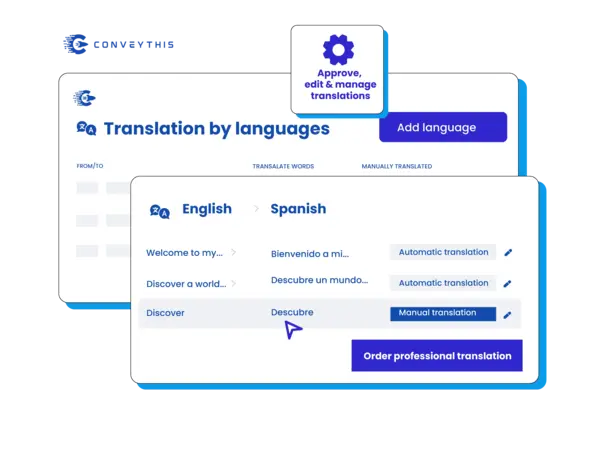
Traducciones perfectas para cada widget y elemento Elementor
Traduce tus diseños de WordPress Elementor con una precisión perfecta en píxeles en 200+ idiomas. ConveyThis detecta de forma inteligente cada widget Elementor, sección y contenido dinámico de WordPress —asegurándose de que no quede nada atrás en la traducción. Edite traducciones mientras obtiene una vista previa de sus diseños Elementor reales, mantenga la integridad del diseño con un manejo inteligente de la expansión de texto y mantenga intacto el atractivo visual de su sitio de WordPress en todos los idiomas. Tu obra maestra Elementor se mantiene hermosa en todos los mercados.
Take Control total de tus traducciones
Gestión de traducción para sitios WordPreess
Ponga las traducciones de su sitio Elementor de WordPress en piloto automático mientras mantiene el control total. ConveyThis detecta automáticamente el nuevo contenido Elementor y las actualizaciones de WordPress, traduciéndolas instantáneamente. Su equipo puede colaborar a través de un panel intuitivo, excluir páginas específicas de WordPress de la traducción y editar contenido con una vista previa en vivo Elementor. Administre múltiples proyectos de WordPress, publique actualizaciones de traducción al instante y observe cómo sus sitios Elementor escalan globalmente sin complejidad.
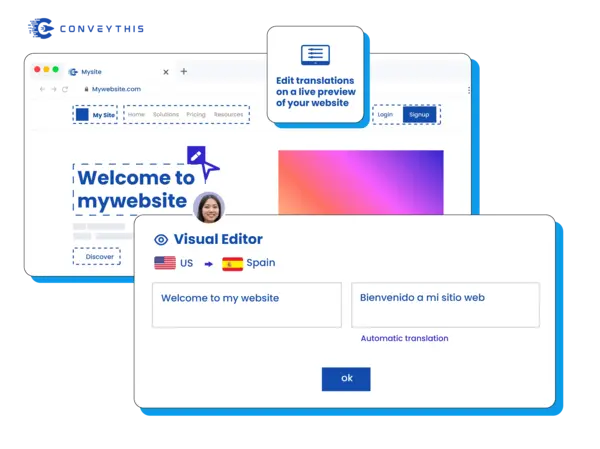
Conectar con audiencias globales auténticamente

Localización completa de WordPress para sitios con tecnología Elementor
Localice cada aspecto de su experiencia en WordPress Elementor para audiencias globales. Reemplace las imágenes en sus galerías Elementor, traduzca formularios y CTA de WordPress, cree estructuras de URL localizadas y asegúrese de que todo el contenido dinámico de WordPress llegue a los mercados locales. Sus páginas diseñadas con Elementor se convierten en experiencias locales totalmente inmersivas que convierten a visitantes internacionales, mientras usted administra todo desde un panel centralizado compatible con WordPress que se integra perfectamente con su flujo de trabajo existente.
Fácilmente gestiona tus traducciones
Proceso de configuración rápida
¡Instala el complemento de WordPress y estarás listo en 2 minutos! No se requieren habilidades técnicas. Simplemente instale ConveyThis desde su panel de WordPress, seleccione sus idiomas y observe cómo sus páginas Elementor se transforman en una experiencia multilingüe. Integración perfecta con su flujo de trabajo Elementor existente.
Optimizado para creadores de páginas
ConveyThis se destaca como la solución ideal para sitios web Elementor, brindando capacidades multilingües integrales que funcionan perfectamente con sus páginas. Mantenga la integridad de su diseño, animaciones personalizadas y diseños responsivos mientras llega a una audiencia global con contenido traducido profesionalmente.
Alcance global, estilo Elementor
Transforme su sitio web Elementor bellamente diseñado en una plataforma global. ConveyThis preserva cada elemento visual, animación y función interactiva al tiempo que hace que su contenido sea accesible para visitantes de todo el mundo. Amplíe su alcance sin comprometer el impresionante diseño que ha creado.
Por qué elegir ConveyThis para Elementor
Un tablero
Administre cadenas, medios, SEO y contenido de aplicaciones en un solo espacio de trabajo.
Glosario y reglas
Bloquee los términos de marca y los nombres de productos para mantener la coherencia de las traducciones.
SEO multilingüe
Hreflang automático, metadatos localizados y URL limpias específicas del idioma.
Editor visual
Traducir en contexto — editar directamente en la página y obtener una vista previa por configuración regional.
Traducción automática
Comience rápidamente con traducciones automáticas, perfeccione las reglas y los recuerdos de la marca.
Estructura del sitio multilingüe
Sirva locales en subdirectorios/subdominios compatibles con SEO con un conmutador accesible.
Redirección automática de visitantes
Opcionalmente, dirija a los visitantes al idioma de su navegador para reducir el rebote.
Aprender cómo empezar
¡Descubre cómo hacer que tu sitio web sea multilingüe y observa cómo crece!
Integre ConveyThis con su sitio web WP siguiendo estos sencillos pasos:
Crear cuenta ConveyThis
Instalar el complemento de WordPress
Configurar la configuración del idioma
Personalizar y administrar
Elementor traducción del sitio: preguntas comunes
Las propias guías de Elementor utilizan WPML. ¿En qué se diferencia ConveyThis?
¿Las ventanas emergentes, formularios y contenidos Elementor cargados se traducen posteriormente?
¿Las plantillas de Theme Builder necesitan sus propias copias traducidas?
¿Puedo dejar un widget Elementor en el idioma original?
¿Qué sucede con los títulos SEO y los datos estructurados en las páginas Elementor?
¿Tienes una pregunta diferente?
Comuníquese con nuestro equipo de soporte dedicado — estamos aquí para ayudarlo, en varios idiomas