
SEO multilingue pour les sites Web













;fill-opacity:1;'%20d='M%2019.511719%2039.964844%20C%208.304688%2039.964844%200%2031.289062%200%2020.324219%20L%200%2020.230469%20C%200%209.363281%208.160156%200.46875%2019.847656%200.46875%20C%2027.023438%200.46875%2031.320312%202.878906%2034.847656%206.375%20L%2029.519531%2012.492188%20C%2026.59375%209.820312%2023.59375%208.179688%2019.800781%208.179688%20C%2013.390625%208.179688%208.761719%2013.53125%208.761719%2020.085938%20L%208.761719%2020.203125%20C%208.761719%2026.757812%2013.273438%2032.203125%2019.800781%2032.203125%20C%2024.144531%2032.203125%2026.808594%2030.46875%2029.808594%2027.722656%20L%2035.136719%2033.121094%20C%2031.199219%2037.335938%2026.855469%2039.964844%2019.511719%2039.964844%20'/%3e%3cpath%20style='%20stroke:none;fill-rule:nonzero;fill:rgb(26.274511%25,42.352942%25,94.901961%25);fill-opacity:1;'%20d='M%2035.878906%200.0351562%20L%2044.136719%200.0351562%20L%2044.136719%2039.867188%20L%2035.878906%2039.867188%20Z%20M%2035.878906%200.0351562%20'/%3e%3cpath%20style='%20stroke:none;fill-rule:nonzero;fill:rgb(26.274511%25,42.352942%25,94.901961%25);fill-opacity:1;'%20d='M%2059.472656%2016.15625%20C%2056.039062%2016.15625%2053.808594%2018.613281%2053.160156%2022.375%20L%2065.617188%2022.375%20C%2065.113281%2018.664062%2062.953125%2016.15625%2059.472656%2016.15625%20M%2073.535156%2027.578125%20L%2053.28125%2027.578125%20C%2054.097656%2031.335938%2056.710938%2033.3125%2060.40625%2033.3125%20C%2063.191406%2033.3125%2065.183594%2032.445312%2067.464844%2030.300781%20L%2072.191406%2034.492188%20C%2069.480469%2037.867188%2065.566406%2039.941406%2060.289062%2039.941406%20C%2051.527344%2039.941406%2045.070312%2033.769531%2045.070312%2024.832031%20L%2045.070312%2024.710938%20C%2045.070312%2016.347656%2051%209.480469%2059.472656%209.480469%20C%2069.191406%209.480469%2073.65625%2017.074219%2073.65625%2025.363281%20L%2073.65625%2025.457031%20C%2073.65625%2026.300781%2073.609375%2026.808594%2073.535156%2027.578125%20'/%3e%3cpath%20style='%20stroke:none;fill-rule:nonzero;fill:rgb(26.274511%25,42.352942%25,94.901961%25);fill-opacity:1;'%20d='M%2089.375%2039.796875%20L%2081.863281%2039.796875%20L%2070.390625%2010.324219%20L%2079.152344%2010.324219%20L%2085.679688%2029.914062%20L%2092.257812%2010.324219%20L%20100.847656%2010.324219%20Z%20M%2089.375%2039.796875%20'/%3e%3cpath%20style='%20stroke:none;fill-rule:nonzero;fill:rgb(26.274511%25,42.352942%25,94.901961%25);fill-opacity:1;'%20d='M%20111.550781%2016.15625%20C%20108.121094%2016.15625%20105.886719%2018.613281%20105.238281%2022.375%20L%20117.695312%2022.375%20C%20117.191406%2018.664062%20115.03125%2016.15625%20111.550781%2016.15625%20M%20125.617188%2027.578125%20L%20105.359375%2027.578125%20C%20106.175781%2031.335938%20108.792969%2033.3125%20112.488281%2033.3125%20C%20115.246094%2033.3125%20117.265625%2032.445312%20119.542969%2030.300781%20L%20124.273438%2034.492188%20C%20121.558594%2037.867188%20117.648438%2039.941406%20112.367188%2039.941406%20C%20103.609375%2039.941406%2097.152344%2033.769531%2097.152344%2024.832031%20L%2097.152344%2024.710938%20C%2097.152344%2016.347656%20103.078125%209.480469%20111.550781%209.480469%20C%20121.273438%209.480469%20125.734375%2017.074219%20125.734375%2025.363281%20L%20125.734375%2025.457031%20C%20125.734375%2026.300781%20125.6875%2026.808594%20125.617188%2027.578125%20'/%3e%3cpath%20style='%20stroke:none;fill-rule:nonzero;fill:rgb(26.274511%25,42.352942%25,94.901961%25);fill-opacity:1;'%20d='M%20143.566406%2018.757812%20C%20138.070312%2018.757812%20134.710938%2022.085938%20134.710938%2029.074219%20L%20134.710938%2039.867188%20L%20126.457031%2039.867188%20L%20126.457031%2010.613281%20L%20134.710938%2010.613281%20L%20134.710938%2016.519531%20C%20136.390625%2012.46875%20139.128906%209.867188%20144%2010.085938%20L%20144%2018.757812%20Z%20M%20143.566406%2018.757812%20'/%3e%3c/g%3e%3c/svg%3e)




;fill-opacity:1;'%20d='M%20144.558594%2039.894531%20L%20155.4375%209.839844%20C%20155.4375%209.839844%20147.28125%209.839844%20139.121094%2011.515625%20L%20128.867188%2039.894531%20Z%20M%20142.675781%201.78125%20L%20140.585938%207.539062%20C%20148.738281%205.863281%20156.902344%205.863281%20156.902344%205.863281%20L%20158.992188%200.105469%20C%20158.992188%200.105469%20150.832031%200.105469%20142.675781%201.78125%20M%2085.980469%2032.773438%20C%2090.898438%2033.71875%2095.914062%2034.136719%20101.039062%2034.136719%20C%20106.375%2034.136719%20110.140625%2032.984375%20110.554688%2029.320312%20C%20110.765625%2027.640625%20109.089844%2026.382812%20106.167969%2024.707031%20C%20102.816406%2022.824219%2099.894531%2021.878906%2096.960938%2019.886719%20C%2094.03125%2017.898438%2092.78125%2014.859375%2093.71875%2011.507812%20C%2094.871094%207.636719%2097.585938%205.4375%20101.664062%203.34375%20C%20106.480469%200.9375%20110.242188%20-0.0078125%20119.550781%20-0.0078125%20C%20125.40625%20-0.0078125%20131.054688%200.515625%20136.597656%201.667969%20L%20134.609375%207.113281%20C%20129.691406%206.167969%20124.675781%205.75%20119.550781%205.75%20C%20114.214844%205.75%20110.453125%206.90625%20110.035156%2010.570312%20C%20109.828125%2012.246094%20111.5%2013.503906%20114.425781%2015.179688%20C%20117.773438%2017.066406%20120.695312%2018.011719%20123.628906%2020%20C%20126.558594%2021.988281%20127.808594%2025.027344%20126.871094%2028.378906%20C%20125.71875%2032.253906%20123.003906%2034.449219%20118.925781%2036.542969%20C%20114.113281%2038.949219%20110.347656%2039.894531%20101.039062%2039.894531%20C%2095.183594%2039.894531%2089.535156%2039.375%2083.992188%2038.21875%20Z%20M%2062.34375%2039.894531%20L%2071.441406%2014.867188%20C%2074.476562%206.488281%2063.390625%209.527344%2060.875%2011.515625%20C%2058.890625%2012.984375%2055.332031%2016.441406%2054.078125%2020.105469%20L%2046.859375%2040%20L%2031.175781%2040%20L%2040.273438%2014.867188%20C%2043.308594%206.488281%2032.222656%209.527344%2029.710938%2011.515625%20C%2027.722656%2012.984375%2024.167969%2016.441406%2022.910156%2020.105469%20L%2015.691406%2040%20L%200.0078125%2040%20L%2014.441406%200.105469%20C%2019.464844%200.105469%2022.179688%201.257812%2024.375%203.457031%20C%2025.207031%204.289062%2025.734375%205.339844%2026.046875%206.496094%20C%2028.980469%204.714844%2031.589844%203.351562%2033.371094%202.726562%20C%2036.613281%201.46875%2040.691406%200.105469%2045.714844%200.105469%20C%2050.734375%200.105469%2053.453125%201.257812%2055.644531%203.457031%20C%2056.480469%204.289062%2057.007812%205.339844%2057.320312%206.496094%20C%2060.25%204.714844%2062.863281%203.351562%2064.640625%202.726562%20C%2067.886719%201.46875%2071.964844%200.113281%2076.984375%200.113281%20C%2082.007812%200.113281%2084.722656%201.265625%2086.917969%203.464844%20C%2089.21875%205.660156%2089.113281%209.742188%2088.28125%2012.050781%20L%2078.027344%2039.902344%20L%2062.34375%2039.902344%20Z%20M%2062.34375%2039.894531%20'/%3e%3c/g%3e%3c/svg%3e)

;fill-opacity:1;'%20d='M%202.453125%209.882812%20L%202.453125%2012.851562%20L%207.304688%2012.851562%20L%2016.800781%2030.734375%20L%2028.488281%2030.734375%20L%2037.980469%2012.824219%20L%2042.832031%2012.792969%20L%2042.84375%209.882812%20L%2028.328125%209.882812%20L%2028.328125%2012.804688%20L%2032.195312%2012.804688%20L%2025.488281%2025.515625%20L%2018.234375%2012.847656%20L%2023.527344%2012.824219%20L%2023.515625%209.882812%20Z%20M%2096.097656%209.882812%20L%2096.097656%2012.851562%20L%20100.949219%2012.851562%20L%20110.445312%2030.734375%20L%20122.128906%2030.734375%20L%20131.625%2012.824219%20L%20136.476562%2012.792969%20L%20136.484375%209.882812%20L%20121.972656%209.882812%20L%20121.972656%2012.804688%20L%20125.835938%2012.804688%20L%20119.132812%2025.515625%20L%20111.878906%2012.847656%20L%20117.167969%2012.824219%20L%20117.160156%209.882812%20Z%20M%2072.222656%209.882812%20L%2072.222656%2012.851562%20L%2077.078125%2012.851562%20L%2077.082031%2027.453125%20L%2071.96875%2027.453125%20L%2071.96875%2030.707031%20L%2077.085938%2030.734375%20L%20101.3125%2030.734375%20L%20101.3125%2021.027344%20L%2098.15625%2021.027344%20C%2097.984375%2026.167969%2093.542969%2027.457031%2091.675781%2027.457031%20C%2089.960938%2027.457031%2086.640625%2027.453125%2086.640625%2027.453125%20L%2086.640625%2012.847656%20L%2091.417969%2012.824219%20L%2091.410156%209.882812%20Z%20M%2055.890625%209.285156%20C%2047.644531%209.285156%2040.960938%2014.214844%2040.960938%2020.292969%20C%2040.960938%2026.375%2047.644531%2031.304688%2055.890625%2031.304688%20C%2064.136719%2031.304688%2070.824219%2026.375%2070.824219%2020.292969%20C%2070.824219%2014.214844%2064.136719%209.285156%2055.890625%209.285156%20Z%20M%2055.675781%2028.0625%20C%2052.769531%2028.0625%2050.414062%2024.566406%2050.414062%2020.25%20C%2050.414062%2015.933594%2052.769531%2012.4375%2055.675781%2012.4375%20C%2058.582031%2012.4375%2060.941406%2015.933594%2060.941406%2020.25%20C%2060.941406%2024.566406%2058.582031%2028.0625%2055.675781%2028.0625%20Z%20M%20149.539062%208.921875%20C%20141.289062%208.921875%20134.605469%2013.933594%20134.605469%2020.113281%20C%20134.605469%2026.292969%20141.289062%2031.300781%20149.539062%2031.300781%20C%20157.78125%2031.300781%20164.46875%2026.292969%20164.46875%2020.113281%20C%20164.46875%2013.933594%20157.78125%208.921875%20149.539062%208.921875%20Z%20M%20149.324219%2028.007812%20C%20146.417969%2028.007812%20144.0625%2024.453125%20144.0625%2020.066406%20C%20144.0625%2015.679688%20146.417969%2012.125%20149.324219%2012.125%20C%20152.230469%2012.125%20154.585938%2015.679688%20154.585938%2020.066406%20C%20154.585938%2024.453125%20152.230469%2028.007812%20149.324219%2028.007812%20Z%20M%20149.324219%2028.007812%20'/%3e%3c/g%3e%3c/svg%3e)






Principales fonctionnalités pour accélérer votre projet de traduction de site Web
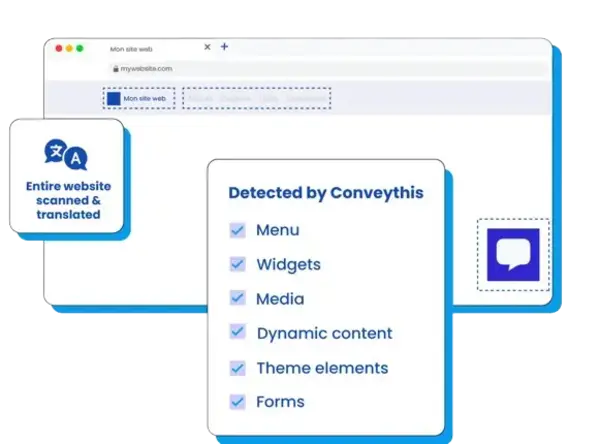
- Détection de contenu
- Mémoire de traduction
- Édition visuelle
- Exporter et importer
- Exclusions
Qu'est-ce que le référencement multilingue ?
Le référencement multilingue est la pratique consistant à optimiser un site Web afin que chaque version linguistique puisse être découverte, explorée et classée par les moteurs de recherche dans le bon pays ou la bonne région. Cela va au-delà de la traduction : vous avez besoin d'URL spécifiques à la langue, de titres traduits et de méta descriptions, correctes balises hreflang, et du contenu qui correspond à l’intention de recherche locale.
Lorsque le référencement multilingue est mal effectué — contenu dupliqué, hreflang manquant ou traductions JavaScript uniquement — Google peut ignorer complètement vos langues alternatives. Un référencement international fort signifie également une intention de recherche correspondante dans chaque région : les Allemands peuvent rechercher des termes différents de ceux des Américains même lorsque le produit sous-jacent est le même.
Lorsque le référencement multilingue est mal effectué — contenu dupliqué, hreflang manquant ou traductions JavaScript uniquement — Google peut ignorer complètement vos langues alternatives. Un référencement international fort signifie également une intention de recherche correspondante dans chaque région : les Allemands peuvent rechercher des termes différents de ceux des Américains même lorsque le produit sous-jacent est le même.
ConveyThis gère automatiquement les bases techniques — URL indexables, hreflang, métadonnées traduites et HTML rendu par le serveur — afin que votre équipe puisse se concentrer sur les mots-clés, la messagerie et les conversions sur chaque marché. Explorez l'intégralité fonctionnalités de traduction de sites Web qui alimentent le référencement multilingue à grande échelle.

Liste de contrôle SEO multilingue
Utilisez cette liste de contrôle lors du lancement ou de l'audit d'un site multilingue. ConveyThis couvre les éléments techniques prêts à l'emploi ; affinez les mots-clés et les métadonnées dans le tableau de bord ou l'éditeur visuel.
- Mots-clés localisés. Adaptez les titres et les textes à la manière dont les gens effectuent leurs recherches sur chaque marché — la traduction littérale omet souvent les termes de grande valeur.
- Plan du site multilingue. Assurez-vous que toutes les URL de langue sont répertoriées et détectables. Consultez notre guide sur sous-répertoires vs sous-domaines pour le référencement multilingue.
- Traductions HTML indexables. Les traductions doivent apparaître dans la source de la page afin que les robots d'exploration ne dépendent pas du côté client JavaScript.
- Liaison interne et routage local. Créez un lien entre des pages associées dans la même langue et dirigez les visiteurs vers le bon endroit. Pour une procédure pas à pas plus approfondie, lisez notre guide sur analyses SEO multilingues.
- Hreflang et balises canoniques. Chaque version linguistique a besoin d'annotations hreflang réciproques et d'un canonique auto-référencé. Les balises manquantes ou contradictoires sont l’une des principales raisons pour lesquelles les pages alternatives ne parviennent pas à se classer.
- Titres traduits, descriptions et texte alternatif. Les balises méta et les attributs alt de l'image doivent être localisés et non copiés mot pour mot de l'anglais. Consultez les URL à fort trafic dans l’éditeur visuel ConveyThis avant le lancement.
- Des données structurées dans toutes les langues. Les cartes JSON-LD, Open Graph et Twitter doivent refléter la localisation active afin que les résultats riches et les aperçus sociaux restent précis sur tous les marchés.
ConveyThis s'occupe de votre référencement technique multilingue

URL de langue dédiées
Crée automatiquement des sous-répertoires ou des sous-domaines pour chaque langue que vous ajoutez, il est essentiel pour Google d'indexer vos pages traduites.
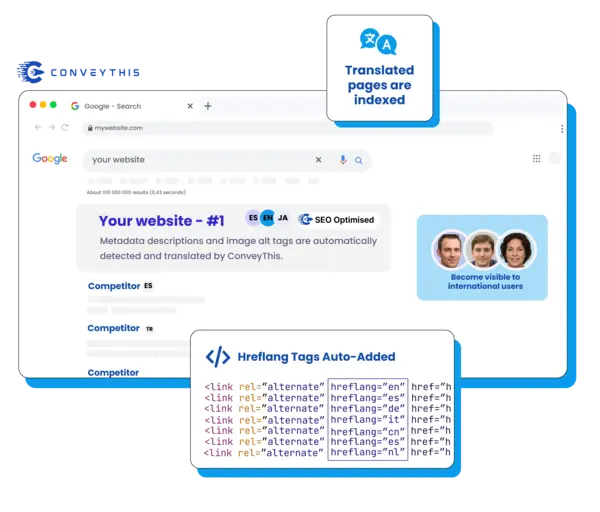
Ajout automatique de balises hreflang
Les balises Hreflang indiquent aux moteurs de recherche la langue d'une page et à qui elle s'adresse, nous l'implémentons automatiquement pour vous.
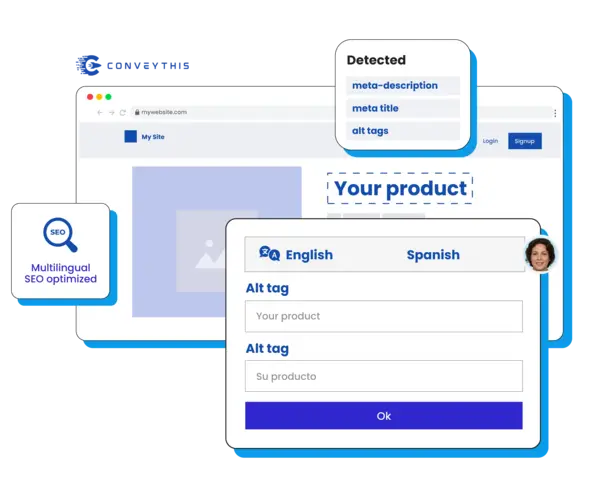
Traduction des métadonnées
Détecte et traduit les métadonnées et les balises alt d'image, vous permettant de les optimiser pour qualité de la traduction et le référencement sur vos marchés cibles.
Un site Web optimisé pour le référencement qui suit les meilleures pratiques de Google
ConveyThis traduit vos pages côté serveur, ce qui signifie que le contenu de votre site est traduit avant d'être envoyé au navigateur du visiteur. La traduction côté serveur suit les meilleures pratiques de Google car elle permet aux robots Google de détecter et d'indexer vos traductions directement dans le code source, prenant en charge des SEO e-commerce.

Un parcours client entièrement localisé
ConveyThis garantit que tous vos points de conversion client clés, y compris les formulaires de génération de leads, les fenêtres contextuelles et les confirmations par e-mail, sont traduits dans le cadre d'un processus complet localisation stratégie. Ce contenu est automatiquement détecté, traduit et disponible pour modification directement dans votre tableau de bord ConveyThis afin que vous puissiez guider sans effort vos clients tout au long de l'entonnoir d'achat. Parfait pour Shopify SEO.

Centralisez votre gestion de traduction
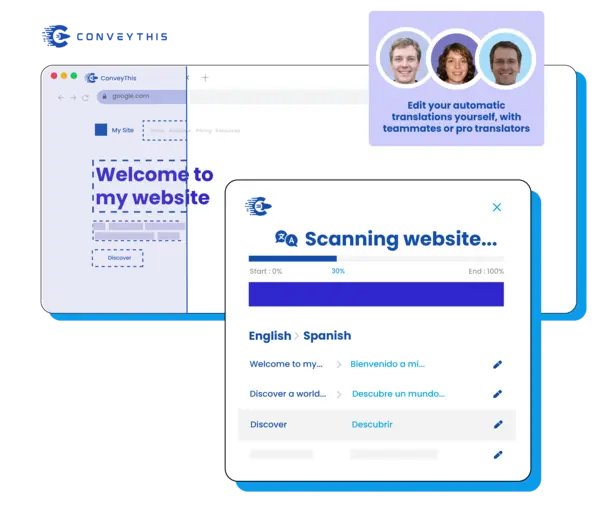
Gérez le contenu localisé de votre site Web avec le tableau de bord facile à utiliser ConveyThis'. Laissez votre équipe de contenu ajouter des traducteurs, collaborer avec vos coéquipiers — le tout au même endroit, comme n'importe quel moderne Traduction SaaS le flux de travail devrait fonctionner.
Erreurs courantes de référencement multilingue
Même les sites bien traduits perdent du trafic international lorsque les bases techniques du référencement sont ignorées. Ce sont les problèmes que nous constatons le plus souvent lors des audits — et ceux que ConveyThis est conçu pour prévenir.
- Traduction automatique sans révision. Raw MT peut produire des titres gênants et des méta descriptions qui nuisent aux taux de clics. Utilisez l’IA pour plus de rapidité, puis affinez les URL prioritaires avant la mise en ligne.
- Mélange de structures d'URL. Basculer entre les sous-domaines et les sous-répertoires en cours de projet perturbe les robots d'exploration. Choisissez un modèle par site et gardez-le cohérent — notre guide sur sous-répertoires vs sous-domaines explique les compromis.
- Blocage des pages traduites. Les règles accidentelles non indexantes, les blocs géographiques ou les entrées robots.txt peuvent masquer des lieux entiers. Valider chaque langue dans Search Console après le lancement.
- Ignorer le comportement de recherche locale. Le volume des mots clés diffère selon les pays. Associez la traduction à la recherche spécifique à la région — en particulier pour les pages de produits, de prix et de destination qui génèrent des revenus.
Lancez le référencement multilingue en quelques minutes
Vous n'avez pas besoin d'un plugin SEO distinct par langue ni d'une implémentation hreflang personnalisée. ConveyThis se connecte à votre CMS, détecte le contenu traduisible (y compris les métadonnées et les formulaires) et publie des URL de langue explorables dès le premier jour.
Commencez par vos pages les plus intéressantes — page d’accueil, prix, catégories de produits — puis développez-les. Utilisez le glossaire pour les termes de marque, invitez les évaluateurs pour l'assurance qualité et surveillez les performances par lieu dans la Search Console. Pour une présentation complète du produit, consultez notre visite guidée ou comparer plans pour votre volume de trafic.
Besoin d'une référence technique plus approfondie ? Parcourir le ConveyThis blog pour hreflang, les analyses internationales et les guides SEO multilingues spécifiques au CMS rédigés par notre équipe.
Questions courantes
Comment puis-je modifier les métadonnées avec ConveyThis ?
Qu'est-ce qu'un sous-domaine ou un sous-répertoire de langue ?
www.example.com/es/ pour l'espagnol. A sous-domaine place la langue avant votre domaine, comme es.example.com. ConveyThis prend en charge les deux structures et les génère automatiquement pour votre site multilingue. Voir notre comparaison de sous-répertoires vs sous-domaines pour le référencement multilingue.Comment puis-je vérifier si mes balises hreflang sont correctement configurées ?
Puis-je afficher uniquement les traductions éditées par des humains dans ConveyThis ?
Est-ce que ConveyThis traduit les titres SEO et les méta descriptions ?
La traduction côté serveur est-elle meilleure pour le référencement multilingue ?
Comment mesurer les performances SEO multilingues ?
Vous avez une question différente ?
Contactez notre équipe d'assistance dédiée — nous sommes là pour vous aider, en plusieurs langues !