
Angular Integration
No card details
No commitment













;fill-opacity:1;'%20d='M%2019.511719%2039.964844%20C%208.304688%2039.964844%200%2031.289062%200%2020.324219%20L%200%2020.230469%20C%200%209.363281%208.160156%200.46875%2019.847656%200.46875%20C%2027.023438%200.46875%2031.320312%202.878906%2034.847656%206.375%20L%2029.519531%2012.492188%20C%2026.59375%209.820312%2023.59375%208.179688%2019.800781%208.179688%20C%2013.390625%208.179688%208.761719%2013.53125%208.761719%2020.085938%20L%208.761719%2020.203125%20C%208.761719%2026.757812%2013.273438%2032.203125%2019.800781%2032.203125%20C%2024.144531%2032.203125%2026.808594%2030.46875%2029.808594%2027.722656%20L%2035.136719%2033.121094%20C%2031.199219%2037.335938%2026.855469%2039.964844%2019.511719%2039.964844%20'/%3e%3cpath%20style='%20stroke:none;fill-rule:nonzero;fill:rgb(26.274511%25,42.352942%25,94.901961%25);fill-opacity:1;'%20d='M%2035.878906%200.0351562%20L%2044.136719%200.0351562%20L%2044.136719%2039.867188%20L%2035.878906%2039.867188%20Z%20M%2035.878906%200.0351562%20'/%3e%3cpath%20style='%20stroke:none;fill-rule:nonzero;fill:rgb(26.274511%25,42.352942%25,94.901961%25);fill-opacity:1;'%20d='M%2059.472656%2016.15625%20C%2056.039062%2016.15625%2053.808594%2018.613281%2053.160156%2022.375%20L%2065.617188%2022.375%20C%2065.113281%2018.664062%2062.953125%2016.15625%2059.472656%2016.15625%20M%2073.535156%2027.578125%20L%2053.28125%2027.578125%20C%2054.097656%2031.335938%2056.710938%2033.3125%2060.40625%2033.3125%20C%2063.191406%2033.3125%2065.183594%2032.445312%2067.464844%2030.300781%20L%2072.191406%2034.492188%20C%2069.480469%2037.867188%2065.566406%2039.941406%2060.289062%2039.941406%20C%2051.527344%2039.941406%2045.070312%2033.769531%2045.070312%2024.832031%20L%2045.070312%2024.710938%20C%2045.070312%2016.347656%2051%209.480469%2059.472656%209.480469%20C%2069.191406%209.480469%2073.65625%2017.074219%2073.65625%2025.363281%20L%2073.65625%2025.457031%20C%2073.65625%2026.300781%2073.609375%2026.808594%2073.535156%2027.578125%20'/%3e%3cpath%20style='%20stroke:none;fill-rule:nonzero;fill:rgb(26.274511%25,42.352942%25,94.901961%25);fill-opacity:1;'%20d='M%2089.375%2039.796875%20L%2081.863281%2039.796875%20L%2070.390625%2010.324219%20L%2079.152344%2010.324219%20L%2085.679688%2029.914062%20L%2092.257812%2010.324219%20L%20100.847656%2010.324219%20Z%20M%2089.375%2039.796875%20'/%3e%3cpath%20style='%20stroke:none;fill-rule:nonzero;fill:rgb(26.274511%25,42.352942%25,94.901961%25);fill-opacity:1;'%20d='M%20111.550781%2016.15625%20C%20108.121094%2016.15625%20105.886719%2018.613281%20105.238281%2022.375%20L%20117.695312%2022.375%20C%20117.191406%2018.664062%20115.03125%2016.15625%20111.550781%2016.15625%20M%20125.617188%2027.578125%20L%20105.359375%2027.578125%20C%20106.175781%2031.335938%20108.792969%2033.3125%20112.488281%2033.3125%20C%20115.246094%2033.3125%20117.265625%2032.445312%20119.542969%2030.300781%20L%20124.273438%2034.492188%20C%20121.558594%2037.867188%20117.648438%2039.941406%20112.367188%2039.941406%20C%20103.609375%2039.941406%2097.152344%2033.769531%2097.152344%2024.832031%20L%2097.152344%2024.710938%20C%2097.152344%2016.347656%20103.078125%209.480469%20111.550781%209.480469%20C%20121.273438%209.480469%20125.734375%2017.074219%20125.734375%2025.363281%20L%20125.734375%2025.457031%20C%20125.734375%2026.300781%20125.6875%2026.808594%20125.617188%2027.578125%20'/%3e%3cpath%20style='%20stroke:none;fill-rule:nonzero;fill:rgb(26.274511%25,42.352942%25,94.901961%25);fill-opacity:1;'%20d='M%20143.566406%2018.757812%20C%20138.070312%2018.757812%20134.710938%2022.085938%20134.710938%2029.074219%20L%20134.710938%2039.867188%20L%20126.457031%2039.867188%20L%20126.457031%2010.613281%20L%20134.710938%2010.613281%20L%20134.710938%2016.519531%20C%20136.390625%2012.46875%20139.128906%209.867188%20144%2010.085938%20L%20144%2018.757812%20Z%20M%20143.566406%2018.757812%20'/%3e%3c/g%3e%3c/svg%3e)




;fill-opacity:1;'%20d='M%20144.558594%2039.894531%20L%20155.4375%209.839844%20C%20155.4375%209.839844%20147.28125%209.839844%20139.121094%2011.515625%20L%20128.867188%2039.894531%20Z%20M%20142.675781%201.78125%20L%20140.585938%207.539062%20C%20148.738281%205.863281%20156.902344%205.863281%20156.902344%205.863281%20L%20158.992188%200.105469%20C%20158.992188%200.105469%20150.832031%200.105469%20142.675781%201.78125%20M%2085.980469%2032.773438%20C%2090.898438%2033.71875%2095.914062%2034.136719%20101.039062%2034.136719%20C%20106.375%2034.136719%20110.140625%2032.984375%20110.554688%2029.320312%20C%20110.765625%2027.640625%20109.089844%2026.382812%20106.167969%2024.707031%20C%20102.816406%2022.824219%2099.894531%2021.878906%2096.960938%2019.886719%20C%2094.03125%2017.898438%2092.78125%2014.859375%2093.71875%2011.507812%20C%2094.871094%207.636719%2097.585938%205.4375%20101.664062%203.34375%20C%20106.480469%200.9375%20110.242188%20-0.0078125%20119.550781%20-0.0078125%20C%20125.40625%20-0.0078125%20131.054688%200.515625%20136.597656%201.667969%20L%20134.609375%207.113281%20C%20129.691406%206.167969%20124.675781%205.75%20119.550781%205.75%20C%20114.214844%205.75%20110.453125%206.90625%20110.035156%2010.570312%20C%20109.828125%2012.246094%20111.5%2013.503906%20114.425781%2015.179688%20C%20117.773438%2017.066406%20120.695312%2018.011719%20123.628906%2020%20C%20126.558594%2021.988281%20127.808594%2025.027344%20126.871094%2028.378906%20C%20125.71875%2032.253906%20123.003906%2034.449219%20118.925781%2036.542969%20C%20114.113281%2038.949219%20110.347656%2039.894531%20101.039062%2039.894531%20C%2095.183594%2039.894531%2089.535156%2039.375%2083.992188%2038.21875%20Z%20M%2062.34375%2039.894531%20L%2071.441406%2014.867188%20C%2074.476562%206.488281%2063.390625%209.527344%2060.875%2011.515625%20C%2058.890625%2012.984375%2055.332031%2016.441406%2054.078125%2020.105469%20L%2046.859375%2040%20L%2031.175781%2040%20L%2040.273438%2014.867188%20C%2043.308594%206.488281%2032.222656%209.527344%2029.710938%2011.515625%20C%2027.722656%2012.984375%2024.167969%2016.441406%2022.910156%2020.105469%20L%2015.691406%2040%20L%200.0078125%2040%20L%2014.441406%200.105469%20C%2019.464844%200.105469%2022.179688%201.257812%2024.375%203.457031%20C%2025.207031%204.289062%2025.734375%205.339844%2026.046875%206.496094%20C%2028.980469%204.714844%2031.589844%203.351562%2033.371094%202.726562%20C%2036.613281%201.46875%2040.691406%200.105469%2045.714844%200.105469%20C%2050.734375%200.105469%2053.453125%201.257812%2055.644531%203.457031%20C%2056.480469%204.289062%2057.007812%205.339844%2057.320312%206.496094%20C%2060.25%204.714844%2062.863281%203.351562%2064.640625%202.726562%20C%2067.886719%201.46875%2071.964844%200.113281%2076.984375%200.113281%20C%2082.007812%200.113281%2084.722656%201.265625%2086.917969%203.464844%20C%2089.21875%205.660156%2089.113281%209.742188%2088.28125%2012.050781%20L%2078.027344%2039.902344%20L%2062.34375%2039.902344%20Z%20M%2062.34375%2039.894531%20'/%3e%3c/g%3e%3c/svg%3e)

;fill-opacity:1;'%20d='M%202.453125%209.882812%20L%202.453125%2012.851562%20L%207.304688%2012.851562%20L%2016.800781%2030.734375%20L%2028.488281%2030.734375%20L%2037.980469%2012.824219%20L%2042.832031%2012.792969%20L%2042.84375%209.882812%20L%2028.328125%209.882812%20L%2028.328125%2012.804688%20L%2032.195312%2012.804688%20L%2025.488281%2025.515625%20L%2018.234375%2012.847656%20L%2023.527344%2012.824219%20L%2023.515625%209.882812%20Z%20M%2096.097656%209.882812%20L%2096.097656%2012.851562%20L%20100.949219%2012.851562%20L%20110.445312%2030.734375%20L%20122.128906%2030.734375%20L%20131.625%2012.824219%20L%20136.476562%2012.792969%20L%20136.484375%209.882812%20L%20121.972656%209.882812%20L%20121.972656%2012.804688%20L%20125.835938%2012.804688%20L%20119.132812%2025.515625%20L%20111.878906%2012.847656%20L%20117.167969%2012.824219%20L%20117.160156%209.882812%20Z%20M%2072.222656%209.882812%20L%2072.222656%2012.851562%20L%2077.078125%2012.851562%20L%2077.082031%2027.453125%20L%2071.96875%2027.453125%20L%2071.96875%2030.707031%20L%2077.085938%2030.734375%20L%20101.3125%2030.734375%20L%20101.3125%2021.027344%20L%2098.15625%2021.027344%20C%2097.984375%2026.167969%2093.542969%2027.457031%2091.675781%2027.457031%20C%2089.960938%2027.457031%2086.640625%2027.453125%2086.640625%2027.453125%20L%2086.640625%2012.847656%20L%2091.417969%2012.824219%20L%2091.410156%209.882812%20Z%20M%2055.890625%209.285156%20C%2047.644531%209.285156%2040.960938%2014.214844%2040.960938%2020.292969%20C%2040.960938%2026.375%2047.644531%2031.304688%2055.890625%2031.304688%20C%2064.136719%2031.304688%2070.824219%2026.375%2070.824219%2020.292969%20C%2070.824219%2014.214844%2064.136719%209.285156%2055.890625%209.285156%20Z%20M%2055.675781%2028.0625%20C%2052.769531%2028.0625%2050.414062%2024.566406%2050.414062%2020.25%20C%2050.414062%2015.933594%2052.769531%2012.4375%2055.675781%2012.4375%20C%2058.582031%2012.4375%2060.941406%2015.933594%2060.941406%2020.25%20C%2060.941406%2024.566406%2058.582031%2028.0625%2055.675781%2028.0625%20Z%20M%20149.539062%208.921875%20C%20141.289062%208.921875%20134.605469%2013.933594%20134.605469%2020.113281%20C%20134.605469%2026.292969%20141.289062%2031.300781%20149.539062%2031.300781%20C%20157.78125%2031.300781%20164.46875%2026.292969%20164.46875%2020.113281%20C%20164.46875%2013.933594%20157.78125%208.921875%20149.539062%208.921875%20Z%20M%20149.324219%2028.007812%20C%20146.417969%2028.007812%20144.0625%2024.453125%20144.0625%2020.066406%20C%20144.0625%2015.679688%20146.417969%2012.125%20149.324219%2012.125%20C%20152.230469%2012.125%20154.585938%2015.679688%20154.585938%2020.066406%20C%20154.585938%2024.453125%20152.230469%2028.007812%20149.324219%2028.007812%20Z%20M%20149.324219%2028.007812%20'/%3e%3c/g%3e%3c/svg%3e)






Angular Translation Plugin Features
- Content detection
- Translation memory
- Visual editing
- Export and import
- Exclusions
How ConveyThis works on Angular
The Angular CLI inserts your compiled bundles into src/index.html by itself, so the ConveyThis script is the one tag you add there by hand. After your next production build and deploy, the widget translates the rendered component views in the browser of each visitor, covering text that shows up after a router navigation or when a lazy-loaded feature opens.
Your templates stay as they are: no i18n attributes to add, no XLIFF files to extract, no extra build for every locale. Translators edit in the ConveyThis dashboard while developers keep shipping a single bundle. When you want language addresses that search engines can index, choose sub-domains like fr.example.com on the Business plan or higher.
Get started in minutes

Instant Angular integration
Quick install in 5 minutes or less! No complex configuration required. Add multilingual functionality to your Angular application effortlessly. Choose from 200+ translated languages and get seamlessly integrated translation capabilities with 100% Angular compatibility.
Complete application translation
Don't change your development workflow! ConveyThis achieves 100% compatibility with Angular as ultimate Translation solution, ensuring all your application content gets translated. Break down language barriers and reach diverse global audiences with robust translation features that enhance accessibility and engagement for international users.
Reach visitors all over the world
Angular SEO Automation for Global Markets
Boost your Angular app's international search rankings with ConveyThis's automated SEO implementation. Get instant hreflang tags, language-specific subdirectories/subdomains, and server-side translation that Google bots can directly index. Transform every customer touchpoint—from forms to pop-ups—into multilingual conversion opportunities while maintaining perfect technical SEO standards for maximum global visibility.

Deliver professional-grade translations
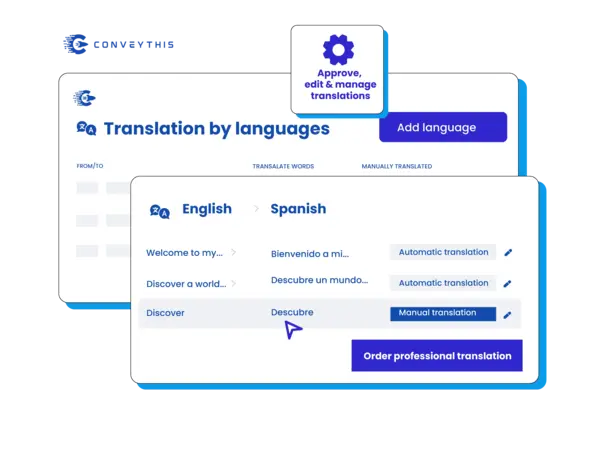
AI-Powered Translation Precision for Angular Apps
Achieve flawless multilingual experiences across 200+ languages with ConveyThis's intelligent translation system. Our AI instantly detects and translates 100% of your Angular components—menus, widgets, dynamic content, and theme elements—while giving you complete editorial control. Use live preview editing, export/import workflows, and smart translation rules to ensure every word perfectly represents your brand in any language.
Take full control of your translations
Smart Translation Management for Angular Teams
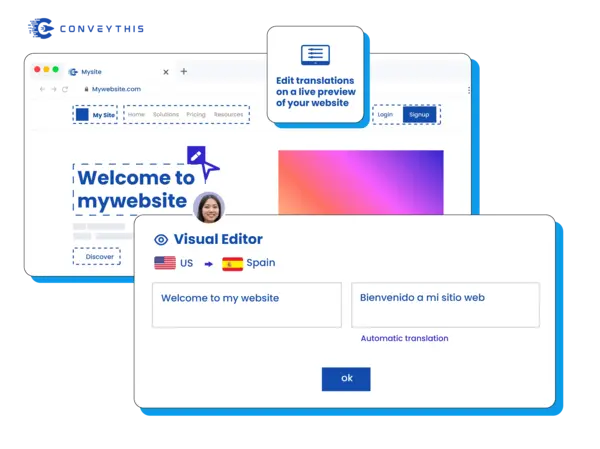
Streamline your Angular localization workflow with ConveyThis's autopilot translation system. Automatically scan and translate your entire application while maintaining granular control over what gets localized. Collaborate seamlessly with your team through live preview editing, instant publishing, and selective page exclusion. Perfect for teams who need precision without the manual overhead.
Connect with global audiences authentically

Full-Stack Angular Localization Beyond Translation
Create truly localized Angular experiences that resonate with global audiences. ConveyThis automatically replaces images and media files, translates all conversion elements, and creates intuitive multilingual URL structures. Build seamless user journeys with customizable localized interfaces that guide international visitors through your application effortlessly—all managed from one powerful dashboard.
Easily manage your translations
Get started in minutes
Quick install - select your languages and you're good to go within 5 minutes or less! No complex Angular configuration required, choose from 200+ translated languages. ConveyThis proudly achieves 100% compatibility as the ultimate Angular Plugin Translation solution with seamless integration.
Perfect for Angular developers
ConveyThis emerges as the optimal choice for Angular Plugin Translation, providing comprehensive multilingual capabilities. With developer-friendly integration and robust translation features, effortlessly transcend language barriers and ensure your Angular applications deliver content that resonates with a diverse global audience.
Translate all over the world
Broaden the global impact of your Angular-powered application with ConveyThis. Seamlessly dismantles language barriers, ensuring your application content is accessible and engaging to a diverse international audience. Expand your digital footprint and connect with a worldwide user base.
Why Choose ConveyThis for Angular
One dashboard
Manage strings, media, SEO, and app content in one workspace.
Glossary & rules
Lock brand terms and product names to keep translations consistent.
Multilingual SEO
Automatic hreflang, localized metadata, and clean language-specific URLs.
Visual editor
Translate in context — edit directly on the page and preview per locale.
Machine translation
Start fast with machine translations, refine with brand rules and memories.
Multilingual site structure
Serve locales on SEO-friendly subdirectories/subdomains with an accessible switcher.
Visitor auto-redirection
Optionally route visitors to their browser language to reduce bounce.
Learn how to get started
Find how to make your website multilingual and watch it grow!
Integrate ConveyThis with your Angular application by following these simple steps:
Create ConveyThis Account
Add Your Domain
Configure Languages
Copy JavaScript Code
Insert Code in Angular
Customize and Optimize
Angular app translation: common questions
Why not use Angular's built-in i18n with @angular/localize?
i18n attribute, run ng extract-i18n, send the extracted files (XLIFF, for example) to translators, then build a separate copy of the app for each locale, usually deployed to its own subdirectory. ConveyThis removes those steps: you keep one build, translation is applied to what the app renders, and new strings are picked up after you deploy. The trade-off: translations live in your ConveyThis account instead of your repository.In an Angular CLI project, which file needs the script?
src/index.html and paste the snippet from your ConveyThis dashboard inside <head>, right before </head>. Because the CLI injects its own script and style tags during the build, this is normally the only tag you maintain in that file. Run your production build, deploy it, and the language menu shows up at the bottom right of the page. The Angular setup guide covers the dashboard side.Are route changes and lazy-loaded components translated?
How do I keep user data or code samples from being translated?
conveythis-no-translate class on the element, for instance a <span> that displays a customer name through interpolation, and it is left exactly as rendered. You can also list element IDs or classes under Content Customization in your dashboard, exclude whole routes with URL rules, or pin brand and product names in the glossary. See exclusions and glossary.Can each language of my Angular app have its own URL?
fr, de and so on) and your production server goes on serving the same build. A /fr/-style sub-directory works as well, but then the domain's A record targets ConveyThis and every request is routed through it. Both options come with hreflang tags, and the URL structure guide lists the DNS records.Have a different question?
Reach out to our dedicated support team — we're here to help, in multiple languages