
WordPress Integration
No card details
No commitment













;fill-opacity:1;'%20d='M%2019.511719%2039.964844%20C%208.304688%2039.964844%200%2031.289062%200%2020.324219%20L%200%2020.230469%20C%200%209.363281%208.160156%200.46875%2019.847656%200.46875%20C%2027.023438%200.46875%2031.320312%202.878906%2034.847656%206.375%20L%2029.519531%2012.492188%20C%2026.59375%209.820312%2023.59375%208.179688%2019.800781%208.179688%20C%2013.390625%208.179688%208.761719%2013.53125%208.761719%2020.085938%20L%208.761719%2020.203125%20C%208.761719%2026.757812%2013.273438%2032.203125%2019.800781%2032.203125%20C%2024.144531%2032.203125%2026.808594%2030.46875%2029.808594%2027.722656%20L%2035.136719%2033.121094%20C%2031.199219%2037.335938%2026.855469%2039.964844%2019.511719%2039.964844%20'/%3e%3cpath%20style='%20stroke:none;fill-rule:nonzero;fill:rgb(26.274511%25,42.352942%25,94.901961%25);fill-opacity:1;'%20d='M%2035.878906%200.0351562%20L%2044.136719%200.0351562%20L%2044.136719%2039.867188%20L%2035.878906%2039.867188%20Z%20M%2035.878906%200.0351562%20'/%3e%3cpath%20style='%20stroke:none;fill-rule:nonzero;fill:rgb(26.274511%25,42.352942%25,94.901961%25);fill-opacity:1;'%20d='M%2059.472656%2016.15625%20C%2056.039062%2016.15625%2053.808594%2018.613281%2053.160156%2022.375%20L%2065.617188%2022.375%20C%2065.113281%2018.664062%2062.953125%2016.15625%2059.472656%2016.15625%20M%2073.535156%2027.578125%20L%2053.28125%2027.578125%20C%2054.097656%2031.335938%2056.710938%2033.3125%2060.40625%2033.3125%20C%2063.191406%2033.3125%2065.183594%2032.445312%2067.464844%2030.300781%20L%2072.191406%2034.492188%20C%2069.480469%2037.867188%2065.566406%2039.941406%2060.289062%2039.941406%20C%2051.527344%2039.941406%2045.070312%2033.769531%2045.070312%2024.832031%20L%2045.070312%2024.710938%20C%2045.070312%2016.347656%2051%209.480469%2059.472656%209.480469%20C%2069.191406%209.480469%2073.65625%2017.074219%2073.65625%2025.363281%20L%2073.65625%2025.457031%20C%2073.65625%2026.300781%2073.609375%2026.808594%2073.535156%2027.578125%20'/%3e%3cpath%20style='%20stroke:none;fill-rule:nonzero;fill:rgb(26.274511%25,42.352942%25,94.901961%25);fill-opacity:1;'%20d='M%2089.375%2039.796875%20L%2081.863281%2039.796875%20L%2070.390625%2010.324219%20L%2079.152344%2010.324219%20L%2085.679688%2029.914062%20L%2092.257812%2010.324219%20L%20100.847656%2010.324219%20Z%20M%2089.375%2039.796875%20'/%3e%3cpath%20style='%20stroke:none;fill-rule:nonzero;fill:rgb(26.274511%25,42.352942%25,94.901961%25);fill-opacity:1;'%20d='M%20111.550781%2016.15625%20C%20108.121094%2016.15625%20105.886719%2018.613281%20105.238281%2022.375%20L%20117.695312%2022.375%20C%20117.191406%2018.664062%20115.03125%2016.15625%20111.550781%2016.15625%20M%20125.617188%2027.578125%20L%20105.359375%2027.578125%20C%20106.175781%2031.335938%20108.792969%2033.3125%20112.488281%2033.3125%20C%20115.246094%2033.3125%20117.265625%2032.445312%20119.542969%2030.300781%20L%20124.273438%2034.492188%20C%20121.558594%2037.867188%20117.648438%2039.941406%20112.367188%2039.941406%20C%20103.609375%2039.941406%2097.152344%2033.769531%2097.152344%2024.832031%20L%2097.152344%2024.710938%20C%2097.152344%2016.347656%20103.078125%209.480469%20111.550781%209.480469%20C%20121.273438%209.480469%20125.734375%2017.074219%20125.734375%2025.363281%20L%20125.734375%2025.457031%20C%20125.734375%2026.300781%20125.6875%2026.808594%20125.617188%2027.578125%20'/%3e%3cpath%20style='%20stroke:none;fill-rule:nonzero;fill:rgb(26.274511%25,42.352942%25,94.901961%25);fill-opacity:1;'%20d='M%20143.566406%2018.757812%20C%20138.070312%2018.757812%20134.710938%2022.085938%20134.710938%2029.074219%20L%20134.710938%2039.867188%20L%20126.457031%2039.867188%20L%20126.457031%2010.613281%20L%20134.710938%2010.613281%20L%20134.710938%2016.519531%20C%20136.390625%2012.46875%20139.128906%209.867188%20144%2010.085938%20L%20144%2018.757812%20Z%20M%20143.566406%2018.757812%20'/%3e%3c/g%3e%3c/svg%3e)




;fill-opacity:1;'%20d='M%20144.558594%2039.894531%20L%20155.4375%209.839844%20C%20155.4375%209.839844%20147.28125%209.839844%20139.121094%2011.515625%20L%20128.867188%2039.894531%20Z%20M%20142.675781%201.78125%20L%20140.585938%207.539062%20C%20148.738281%205.863281%20156.902344%205.863281%20156.902344%205.863281%20L%20158.992188%200.105469%20C%20158.992188%200.105469%20150.832031%200.105469%20142.675781%201.78125%20M%2085.980469%2032.773438%20C%2090.898438%2033.71875%2095.914062%2034.136719%20101.039062%2034.136719%20C%20106.375%2034.136719%20110.140625%2032.984375%20110.554688%2029.320312%20C%20110.765625%2027.640625%20109.089844%2026.382812%20106.167969%2024.707031%20C%20102.816406%2022.824219%2099.894531%2021.878906%2096.960938%2019.886719%20C%2094.03125%2017.898438%2092.78125%2014.859375%2093.71875%2011.507812%20C%2094.871094%207.636719%2097.585938%205.4375%20101.664062%203.34375%20C%20106.480469%200.9375%20110.242188%20-0.0078125%20119.550781%20-0.0078125%20C%20125.40625%20-0.0078125%20131.054688%200.515625%20136.597656%201.667969%20L%20134.609375%207.113281%20C%20129.691406%206.167969%20124.675781%205.75%20119.550781%205.75%20C%20114.214844%205.75%20110.453125%206.90625%20110.035156%2010.570312%20C%20109.828125%2012.246094%20111.5%2013.503906%20114.425781%2015.179688%20C%20117.773438%2017.066406%20120.695312%2018.011719%20123.628906%2020%20C%20126.558594%2021.988281%20127.808594%2025.027344%20126.871094%2028.378906%20C%20125.71875%2032.253906%20123.003906%2034.449219%20118.925781%2036.542969%20C%20114.113281%2038.949219%20110.347656%2039.894531%20101.039062%2039.894531%20C%2095.183594%2039.894531%2089.535156%2039.375%2083.992188%2038.21875%20Z%20M%2062.34375%2039.894531%20L%2071.441406%2014.867188%20C%2074.476562%206.488281%2063.390625%209.527344%2060.875%2011.515625%20C%2058.890625%2012.984375%2055.332031%2016.441406%2054.078125%2020.105469%20L%2046.859375%2040%20L%2031.175781%2040%20L%2040.273438%2014.867188%20C%2043.308594%206.488281%2032.222656%209.527344%2029.710938%2011.515625%20C%2027.722656%2012.984375%2024.167969%2016.441406%2022.910156%2020.105469%20L%2015.691406%2040%20L%200.0078125%2040%20L%2014.441406%200.105469%20C%2019.464844%200.105469%2022.179688%201.257812%2024.375%203.457031%20C%2025.207031%204.289062%2025.734375%205.339844%2026.046875%206.496094%20C%2028.980469%204.714844%2031.589844%203.351562%2033.371094%202.726562%20C%2036.613281%201.46875%2040.691406%200.105469%2045.714844%200.105469%20C%2050.734375%200.105469%2053.453125%201.257812%2055.644531%203.457031%20C%2056.480469%204.289062%2057.007812%205.339844%2057.320312%206.496094%20C%2060.25%204.714844%2062.863281%203.351562%2064.640625%202.726562%20C%2067.886719%201.46875%2071.964844%200.113281%2076.984375%200.113281%20C%2082.007812%200.113281%2084.722656%201.265625%2086.917969%203.464844%20C%2089.21875%205.660156%2089.113281%209.742188%2088.28125%2012.050781%20L%2078.027344%2039.902344%20L%2062.34375%2039.902344%20Z%20M%2062.34375%2039.894531%20'/%3e%3c/g%3e%3c/svg%3e)

;fill-opacity:1;'%20d='M%202.453125%209.882812%20L%202.453125%2012.851562%20L%207.304688%2012.851562%20L%2016.800781%2030.734375%20L%2028.488281%2030.734375%20L%2037.980469%2012.824219%20L%2042.832031%2012.792969%20L%2042.84375%209.882812%20L%2028.328125%209.882812%20L%2028.328125%2012.804688%20L%2032.195312%2012.804688%20L%2025.488281%2025.515625%20L%2018.234375%2012.847656%20L%2023.527344%2012.824219%20L%2023.515625%209.882812%20Z%20M%2096.097656%209.882812%20L%2096.097656%2012.851562%20L%20100.949219%2012.851562%20L%20110.445312%2030.734375%20L%20122.128906%2030.734375%20L%20131.625%2012.824219%20L%20136.476562%2012.792969%20L%20136.484375%209.882812%20L%20121.972656%209.882812%20L%20121.972656%2012.804688%20L%20125.835938%2012.804688%20L%20119.132812%2025.515625%20L%20111.878906%2012.847656%20L%20117.167969%2012.824219%20L%20117.160156%209.882812%20Z%20M%2072.222656%209.882812%20L%2072.222656%2012.851562%20L%2077.078125%2012.851562%20L%2077.082031%2027.453125%20L%2071.96875%2027.453125%20L%2071.96875%2030.707031%20L%2077.085938%2030.734375%20L%20101.3125%2030.734375%20L%20101.3125%2021.027344%20L%2098.15625%2021.027344%20C%2097.984375%2026.167969%2093.542969%2027.457031%2091.675781%2027.457031%20C%2089.960938%2027.457031%2086.640625%2027.453125%2086.640625%2027.453125%20L%2086.640625%2012.847656%20L%2091.417969%2012.824219%20L%2091.410156%209.882812%20Z%20M%2055.890625%209.285156%20C%2047.644531%209.285156%2040.960938%2014.214844%2040.960938%2020.292969%20C%2040.960938%2026.375%2047.644531%2031.304688%2055.890625%2031.304688%20C%2064.136719%2031.304688%2070.824219%2026.375%2070.824219%2020.292969%20C%2070.824219%2014.214844%2064.136719%209.285156%2055.890625%209.285156%20Z%20M%2055.675781%2028.0625%20C%2052.769531%2028.0625%2050.414062%2024.566406%2050.414062%2020.25%20C%2050.414062%2015.933594%2052.769531%2012.4375%2055.675781%2012.4375%20C%2058.582031%2012.4375%2060.941406%2015.933594%2060.941406%2020.25%20C%2060.941406%2024.566406%2058.582031%2028.0625%2055.675781%2028.0625%20Z%20M%20149.539062%208.921875%20C%20141.289062%208.921875%20134.605469%2013.933594%20134.605469%2020.113281%20C%20134.605469%2026.292969%20141.289062%2031.300781%20149.539062%2031.300781%20C%20157.78125%2031.300781%20164.46875%2026.292969%20164.46875%2020.113281%20C%20164.46875%2013.933594%20157.78125%208.921875%20149.539062%208.921875%20Z%20M%20149.324219%2028.007812%20C%20146.417969%2028.007812%20144.0625%2024.453125%20144.0625%2020.066406%20C%20144.0625%2015.679688%20146.417969%2012.125%20149.324219%2012.125%20C%20152.230469%2012.125%20154.585938%2015.679688%20154.585938%2020.066406%20C%20154.585938%2024.453125%20152.230469%2028.007812%20149.324219%2028.007812%20Z%20M%20149.324219%2028.007812%20'/%3e%3c/g%3e%3c/svg%3e)






WordPress Translation Plugin Features
- Content detection
- Translation memory
- Visual editing
- Export and import
- Exclusions
How ConveyThis works on WordPress
Install the free ConveyThis plugin from the WordPress.org directory, paste the API key from your ConveyThis account, and choose your languages. The plugin adds a language switcher and serves each language from its own folder, such as /fr/ or /de/, without any DNS change.
Translations are stored in your ConveyThis account rather than as extra posts in your database, so theme and plugin updates leave them alone. When you publish or edit a post, product or page, the new text is detected and translated automatically; you can then correct it in the visual editor, lock terms in the glossary, and reuse earlier edits through translation memory.
For search engines, every language version gets hreflang tags plus translated titles, meta descriptions and structured data, so a French visitor can land on the French page directly. WooCommerce stores use the same plugin for products, cart and checkout.
Beyond page text, the plugin can translate image alt text and swap images or videos for a specific language, send visitors to their browser language on arrival, and give editors, translators and reviewers their own roles with an approval step for translation reviews. Switcher design, excluded pages and URL structure are set on the ConveyThis screen in your WordPress admin, while day-to-day editing happens in your ConveyThis dashboard. Not sure how big your site is? The free word counter estimates how many words need translating before you pick a plan.
Two options suit busy WordPress editors in particular. You can order a professional human translator for key pages straight from the ConveyThis dashboard, and you can build a custom AI language model from your glossary, your earlier edits and your style preferences, so that new posts arrive in your brand voice instead of generic machine phrasing.
How to Install WordPress Translation Plugin

One-Click WordPress Multilingual Setup
Transform your WordPress site into a multilingual platform in minutes, simple and easy. Our plugin installs like any WordPress plugin and automatically configures language detection, visitor routing, and an elegant language switcher that adapts to your theme design. Start reaching global audiences without touching a single line of code or disrupting your current workflow.
Translate Every WordPress Element
Cover your entire WordPress ecosystem with translation technology that finds and translates everything automatically. From blog posts and custom fields to plugin notifications and theme text strings – no content gets missed. Continue managing your site exactly as before while our system handles the complexity of keeping all languages synchronized and up-to-date.
WordPress Multilingual SEO for Global Traffic
WordPress Organic Traffic Optimization
Boost your WordPress site's international search visibility with automated multilingual SEO features. ConveyThis generates proper hreflang tags, creates SEO-friendly URL structures, and translates meta titles and descriptions without additional SEO plugins. Your content gets indexed correctly across all target languages while maintaining your existing WordPress SEO setup.

WordPress Translation Quality & Accuracy
WordPress Content Translation Control
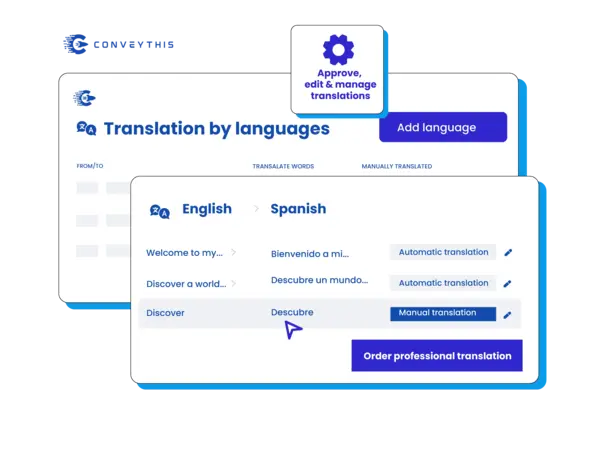
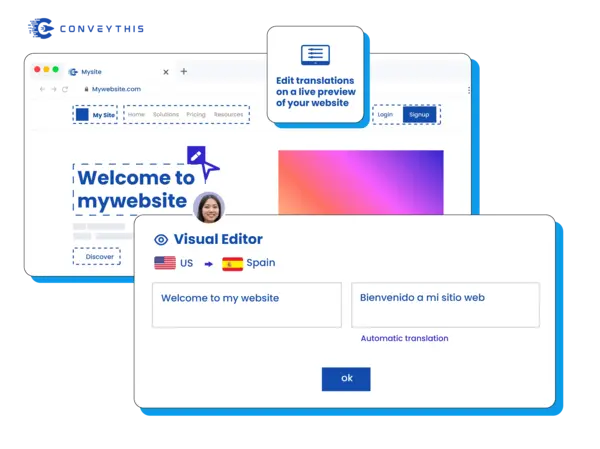
Translate your WordPress content with precision and maintain quality across all languages. ConveyThis provides AI translation with manual editing capabilities for posts, pages, and custom content. The visual editor lets you see translations in context within your WordPress theme, ensuring accuracy for blog posts, landing pages, and any custom post types you use.
WordPress Translation Dashboard & Management
WordPress Translation Team Management
Coordinate translation projects across your WordPress site with team collaboration tools. ConveyThis allows you to assign different translators to specific content areas, manage workflow approvals, and track translation progress. The system integrates smoothly with WordPress user roles, making it easier to manage large content sites with multiple contributors and translators.
Connect with global audiences authentically

Full WordPress Site Localization
Localize every element of your WordPress site including widgets, menus, forms, and media files. ConveyThis translates custom post types, plugin content, and theme elements automatically. The solution works with any WordPress theme and handles complex content structures without requiring theme modifications or additional plugin configurations.
Easily manage your translations
Intelligent AI Translation
Harness cutting-edge artificial intelligence to deliver professional-quality translations at scale. Our advanced neural networks understand context, tone, and cultural nuances to produce accurate translations. Fine-tune results with our intuitive editing tools and maintain brand consistency across all languages.
Rapid Installation Process
Go from monolingual to multilingual in under 5 minutes with our streamlined setup process. Our one-click installation eliminates technical barriers and complex configurations. Experience the simplest WordPress translation solution that requires zero coding knowledge or technical expertise.
Dynamic SEO Enhancement
Maximize your international visibility with automated SEO optimization that adapts to each target market. Our system intelligently optimizes translated content for local search algorithms, implements proper URL structures, and ensures cultural relevance. Drive organic growth across global markets with translations that rank and convert.
Why Choose ConveyThis for WordPress
One dashboard
Manage strings, media, SEO, and app content in one workspace.
Glossary & rules
Lock brand terms and product names to keep translations consistent.
Multilingual SEO
Automatic hreflang, localized metadata, and clean language-specific URLs.
Visual editor
Translate in context — edit directly on the page and preview per locale.
Machine translation
Start fast with machine translations, refine with brand rules and memories.
Multilingual site structure
Serve locales on SEO-friendly subdirectories/subdomains with an accessible switcher.
Visitor auto-redirection
Optionally route visitors to their browser language to reduce bounce.
Learn how to get started
Find how to make your website multilingual and watch it grow!
Integrate ConveyThis with your WordPress by following next simple steps:
Account Registration
Plugin Installation
Language Configuration
Translation Management
WordPress translation plugin: common questions
How is the ConveyThis plugin different from WPML?
Does the plugin translate WooCommerce products, cart and checkout?
What URLs do translated WordPress pages get, and are they indexed?
example.com/fr/ with no DNS change. You can switch the plugin's URL structure to sub-domains (fr.example.com) if you prefer; the plugin then lists the CNAME record to add for each language. Either way ConveyThis adds hreflang tags and translates page titles and meta descriptions, so each language version can be crawled and ranked on its own.Will it work with my theme, Elementor, Divi or Yoast SEO?
How much does it cost to translate a WordPress site?
Have a different question?
Reach out to our dedicated support team — we're here to help, in multiple languages