












;fill-opacity:1;'%20d='M%2019.511719%2039.964844%20C%208.304688%2039.964844%200%2031.289062%200%2020.324219%20L%200%2020.230469%20C%200%209.363281%208.160156%200.46875%2019.847656%200.46875%20C%2027.023438%200.46875%2031.320312%202.878906%2034.847656%206.375%20L%2029.519531%2012.492188%20C%2026.59375%209.820312%2023.59375%208.179688%2019.800781%208.179688%20C%2013.390625%208.179688%208.761719%2013.53125%208.761719%2020.085938%20L%208.761719%2020.203125%20C%208.761719%2026.757812%2013.273438%2032.203125%2019.800781%2032.203125%20C%2024.144531%2032.203125%2026.808594%2030.46875%2029.808594%2027.722656%20L%2035.136719%2033.121094%20C%2031.199219%2037.335938%2026.855469%2039.964844%2019.511719%2039.964844%20'/%3e%3cpath%20style='%20stroke:none;fill-rule:nonzero;fill:rgb(26.274511%25,42.352942%25,94.901961%25);fill-opacity:1;'%20d='M%2035.878906%200.0351562%20L%2044.136719%200.0351562%20L%2044.136719%2039.867188%20L%2035.878906%2039.867188%20Z%20M%2035.878906%200.0351562%20'/%3e%3cpath%20style='%20stroke:none;fill-rule:nonzero;fill:rgb(26.274511%25,42.352942%25,94.901961%25);fill-opacity:1;'%20d='M%2059.472656%2016.15625%20C%2056.039062%2016.15625%2053.808594%2018.613281%2053.160156%2022.375%20L%2065.617188%2022.375%20C%2065.113281%2018.664062%2062.953125%2016.15625%2059.472656%2016.15625%20M%2073.535156%2027.578125%20L%2053.28125%2027.578125%20C%2054.097656%2031.335938%2056.710938%2033.3125%2060.40625%2033.3125%20C%2063.191406%2033.3125%2065.183594%2032.445312%2067.464844%2030.300781%20L%2072.191406%2034.492188%20C%2069.480469%2037.867188%2065.566406%2039.941406%2060.289062%2039.941406%20C%2051.527344%2039.941406%2045.070312%2033.769531%2045.070312%2024.832031%20L%2045.070312%2024.710938%20C%2045.070312%2016.347656%2051%209.480469%2059.472656%209.480469%20C%2069.191406%209.480469%2073.65625%2017.074219%2073.65625%2025.363281%20L%2073.65625%2025.457031%20C%2073.65625%2026.300781%2073.609375%2026.808594%2073.535156%2027.578125%20'/%3e%3cpath%20style='%20stroke:none;fill-rule:nonzero;fill:rgb(26.274511%25,42.352942%25,94.901961%25);fill-opacity:1;'%20d='M%2089.375%2039.796875%20L%2081.863281%2039.796875%20L%2070.390625%2010.324219%20L%2079.152344%2010.324219%20L%2085.679688%2029.914062%20L%2092.257812%2010.324219%20L%20100.847656%2010.324219%20Z%20M%2089.375%2039.796875%20'/%3e%3cpath%20style='%20stroke:none;fill-rule:nonzero;fill:rgb(26.274511%25,42.352942%25,94.901961%25);fill-opacity:1;'%20d='M%20111.550781%2016.15625%20C%20108.121094%2016.15625%20105.886719%2018.613281%20105.238281%2022.375%20L%20117.695312%2022.375%20C%20117.191406%2018.664062%20115.03125%2016.15625%20111.550781%2016.15625%20M%20125.617188%2027.578125%20L%20105.359375%2027.578125%20C%20106.175781%2031.335938%20108.792969%2033.3125%20112.488281%2033.3125%20C%20115.246094%2033.3125%20117.265625%2032.445312%20119.542969%2030.300781%20L%20124.273438%2034.492188%20C%20121.558594%2037.867188%20117.648438%2039.941406%20112.367188%2039.941406%20C%20103.609375%2039.941406%2097.152344%2033.769531%2097.152344%2024.832031%20L%2097.152344%2024.710938%20C%2097.152344%2016.347656%20103.078125%209.480469%20111.550781%209.480469%20C%20121.273438%209.480469%20125.734375%2017.074219%20125.734375%2025.363281%20L%20125.734375%2025.457031%20C%20125.734375%2026.300781%20125.6875%2026.808594%20125.617188%2027.578125%20'/%3e%3cpath%20style='%20stroke:none;fill-rule:nonzero;fill:rgb(26.274511%25,42.352942%25,94.901961%25);fill-opacity:1;'%20d='M%20143.566406%2018.757812%20C%20138.070312%2018.757812%20134.710938%2022.085938%20134.710938%2029.074219%20L%20134.710938%2039.867188%20L%20126.457031%2039.867188%20L%20126.457031%2010.613281%20L%20134.710938%2010.613281%20L%20134.710938%2016.519531%20C%20136.390625%2012.46875%20139.128906%209.867188%20144%2010.085938%20L%20144%2018.757812%20Z%20M%20143.566406%2018.757812%20'/%3e%3c/g%3e%3c/svg%3e)




;fill-opacity:1;'%20d='M%20144.558594%2039.894531%20L%20155.4375%209.839844%20C%20155.4375%209.839844%20147.28125%209.839844%20139.121094%2011.515625%20L%20128.867188%2039.894531%20Z%20M%20142.675781%201.78125%20L%20140.585938%207.539062%20C%20148.738281%205.863281%20156.902344%205.863281%20156.902344%205.863281%20L%20158.992188%200.105469%20C%20158.992188%200.105469%20150.832031%200.105469%20142.675781%201.78125%20M%2085.980469%2032.773438%20C%2090.898438%2033.71875%2095.914062%2034.136719%20101.039062%2034.136719%20C%20106.375%2034.136719%20110.140625%2032.984375%20110.554688%2029.320312%20C%20110.765625%2027.640625%20109.089844%2026.382812%20106.167969%2024.707031%20C%20102.816406%2022.824219%2099.894531%2021.878906%2096.960938%2019.886719%20C%2094.03125%2017.898438%2092.78125%2014.859375%2093.71875%2011.507812%20C%2094.871094%207.636719%2097.585938%205.4375%20101.664062%203.34375%20C%20106.480469%200.9375%20110.242188%20-0.0078125%20119.550781%20-0.0078125%20C%20125.40625%20-0.0078125%20131.054688%200.515625%20136.597656%201.667969%20L%20134.609375%207.113281%20C%20129.691406%206.167969%20124.675781%205.75%20119.550781%205.75%20C%20114.214844%205.75%20110.453125%206.90625%20110.035156%2010.570312%20C%20109.828125%2012.246094%20111.5%2013.503906%20114.425781%2015.179688%20C%20117.773438%2017.066406%20120.695312%2018.011719%20123.628906%2020%20C%20126.558594%2021.988281%20127.808594%2025.027344%20126.871094%2028.378906%20C%20125.71875%2032.253906%20123.003906%2034.449219%20118.925781%2036.542969%20C%20114.113281%2038.949219%20110.347656%2039.894531%20101.039062%2039.894531%20C%2095.183594%2039.894531%2089.535156%2039.375%2083.992188%2038.21875%20Z%20M%2062.34375%2039.894531%20L%2071.441406%2014.867188%20C%2074.476562%206.488281%2063.390625%209.527344%2060.875%2011.515625%20C%2058.890625%2012.984375%2055.332031%2016.441406%2054.078125%2020.105469%20L%2046.859375%2040%20L%2031.175781%2040%20L%2040.273438%2014.867188%20C%2043.308594%206.488281%2032.222656%209.527344%2029.710938%2011.515625%20C%2027.722656%2012.984375%2024.167969%2016.441406%2022.910156%2020.105469%20L%2015.691406%2040%20L%200.0078125%2040%20L%2014.441406%200.105469%20C%2019.464844%200.105469%2022.179688%201.257812%2024.375%203.457031%20C%2025.207031%204.289062%2025.734375%205.339844%2026.046875%206.496094%20C%2028.980469%204.714844%2031.589844%203.351562%2033.371094%202.726562%20C%2036.613281%201.46875%2040.691406%200.105469%2045.714844%200.105469%20C%2050.734375%200.105469%2053.453125%201.257812%2055.644531%203.457031%20C%2056.480469%204.289062%2057.007812%205.339844%2057.320312%206.496094%20C%2060.25%204.714844%2062.863281%203.351562%2064.640625%202.726562%20C%2067.886719%201.46875%2071.964844%200.113281%2076.984375%200.113281%20C%2082.007812%200.113281%2084.722656%201.265625%2086.917969%203.464844%20C%2089.21875%205.660156%2089.113281%209.742188%2088.28125%2012.050781%20L%2078.027344%2039.902344%20L%2062.34375%2039.902344%20Z%20M%2062.34375%2039.894531%20'/%3e%3c/g%3e%3c/svg%3e)

;fill-opacity:1;'%20d='M%202.453125%209.882812%20L%202.453125%2012.851562%20L%207.304688%2012.851562%20L%2016.800781%2030.734375%20L%2028.488281%2030.734375%20L%2037.980469%2012.824219%20L%2042.832031%2012.792969%20L%2042.84375%209.882812%20L%2028.328125%209.882812%20L%2028.328125%2012.804688%20L%2032.195312%2012.804688%20L%2025.488281%2025.515625%20L%2018.234375%2012.847656%20L%2023.527344%2012.824219%20L%2023.515625%209.882812%20Z%20M%2096.097656%209.882812%20L%2096.097656%2012.851562%20L%20100.949219%2012.851562%20L%20110.445312%2030.734375%20L%20122.128906%2030.734375%20L%20131.625%2012.824219%20L%20136.476562%2012.792969%20L%20136.484375%209.882812%20L%20121.972656%209.882812%20L%20121.972656%2012.804688%20L%20125.835938%2012.804688%20L%20119.132812%2025.515625%20L%20111.878906%2012.847656%20L%20117.167969%2012.824219%20L%20117.160156%209.882812%20Z%20M%2072.222656%209.882812%20L%2072.222656%2012.851562%20L%2077.078125%2012.851562%20L%2077.082031%2027.453125%20L%2071.96875%2027.453125%20L%2071.96875%2030.707031%20L%2077.085938%2030.734375%20L%20101.3125%2030.734375%20L%20101.3125%2021.027344%20L%2098.15625%2021.027344%20C%2097.984375%2026.167969%2093.542969%2027.457031%2091.675781%2027.457031%20C%2089.960938%2027.457031%2086.640625%2027.453125%2086.640625%2027.453125%20L%2086.640625%2012.847656%20L%2091.417969%2012.824219%20L%2091.410156%209.882812%20Z%20M%2055.890625%209.285156%20C%2047.644531%209.285156%2040.960938%2014.214844%2040.960938%2020.292969%20C%2040.960938%2026.375%2047.644531%2031.304688%2055.890625%2031.304688%20C%2064.136719%2031.304688%2070.824219%2026.375%2070.824219%2020.292969%20C%2070.824219%2014.214844%2064.136719%209.285156%2055.890625%209.285156%20Z%20M%2055.675781%2028.0625%20C%2052.769531%2028.0625%2050.414062%2024.566406%2050.414062%2020.25%20C%2050.414062%2015.933594%2052.769531%2012.4375%2055.675781%2012.4375%20C%2058.582031%2012.4375%2060.941406%2015.933594%2060.941406%2020.25%20C%2060.941406%2024.566406%2058.582031%2028.0625%2055.675781%2028.0625%20Z%20M%20149.539062%208.921875%20C%20141.289062%208.921875%20134.605469%2013.933594%20134.605469%2020.113281%20C%20134.605469%2026.292969%20141.289062%2031.300781%20149.539062%2031.300781%20C%20157.78125%2031.300781%20164.46875%2026.292969%20164.46875%2020.113281%20C%20164.46875%2013.933594%20157.78125%208.921875%20149.539062%208.921875%20Z%20M%20149.324219%2028.007812%20C%20146.417969%2028.007812%20144.0625%2024.453125%20144.0625%2020.066406%20C%20144.0625%2015.679688%20146.417969%2012.125%20149.324219%2012.125%20C%20152.230469%2012.125%20154.585938%2015.679688%20154.585938%2020.066406%20C%20154.585938%2024.453125%20152.230469%2028.007812%20149.324219%2028.007812%20Z%20M%20149.324219%2028.007812%20'/%3e%3c/g%3e%3c/svg%3e)








Migrating a multilingual website has traditionally been one of the most frustrating parts of changing translation platforms. Even when a better solution exists, businesses often stay with their current provider simply because they do not want to lose years of translation work.
That is exactly why ConveyThis built 1-Click Translation Import — a feature designed to make switching from Weglot, Bablic, or any other translation tool surprisingly simple.

Which platforms can you import from?
ConveyThis accepts translation files exported from the tools most teams already use:
- Weglot — export your translations as CSV directly from the dashboard
- Bablic — upload your existing Bablic CSV or TMX export
- Other tools — any platform that exports standard CSV or TMX translation files
You do not need to re-translate or manually rebuild your multilingual site. Upload the file, map your language pairs, and your existing work comes with you — free on every plan.
Why translation migration has always been a pain
If you have invested hundreds or thousands of hours translating your website, those translations become one of your most valuable assets. They are not disposable content — they are intellectual property tied directly to revenue, SEO rankings, and customer trust in every market you serve.
Unfortunately, moving to another website translation platform often means:
- Exporting translation files manually from your old dashboard
- Cleaning and reformatting data to match a new schema
- Matching pages, URLs, and language pairs one by one
- Re-uploading translations and hoping nothing breaks
- Checking every page for missing strings or broken layouts
- Spending days — sometimes weeks — verifying everything works correctly
For many website owners, the migration process becomes so intimidating that they postpone switching indefinitely, even when their current tool is too expensive, too limited, or missing features they need.
That is the hidden cost of platform lock-in: not just monthly fees, but the fear of starting over.
The simple alternative: 1-Click Import
With ConveyThis’s 1-Click Translation Import, users can bring existing translations from Weglot, Bablic, or other compatible tools directly into ConveyThis without rebuilding their multilingual website from scratch.
Instead of manually exporting, converting, and re-importing translation files across multiple tools, the process is designed to transfer your existing translated content automatically. Upload your CSV or TMX export, select your languages, and ConveyThis handles the mapping.
The result is straightforward:
- Keep your existing translations — human edits, glossary terms, and MT output included
- Preserve previous translation investments — no need to pay translators again for work already done
- Reduce migration time dramatically — minutes instead of days
- Launch on the new platform faster — go live with confidence, not a blank slate
Import is 100% free on every ConveyThis plan, including the free tier. There is no extra charge to bring your existing translation work with you — regardless of which platform you are leaving.
Start your free trial and import your translations today.
Old migration vs. 1-Click Import
| Step | Traditional migration | ConveyThis 1-Click Import |
|---|---|---|
| Export from your current tool | Manual export, often per language | Same export — one CSV or TMX file |
| Format conversion | Spreadsheet cleanup, column mapping | Not required — CSV and TMX supported natively |
| Page matching | Manual URL and string matching | Automatic mapping in the dashboard |
| Time to complete | Days to weeks | Typically minutes |
| Risk of data loss | High — easy to miss strings or pages | Low — review imported content before publishing |
| Cost | Developer or agency hours | Free on every plan |
How to import your translations (step by step)
Ready to switch? The workflow is the same whether you are leaving Weglot, Bablic, or another platform:
- Export your translations from your current tool as a CSV or TMX file (include every language pair you want to keep).
- Create a ConveyThis account and connect your website — WordPress, Shopify, Webflow, or any site with a JavaScript snippet.
- Open the Import Translations page in your ConveyThis dashboard for the domain you want to migrate.
- Select your source language and target language(s), then upload your export file.
- Review imported strings in the visual editor, adjust anything that needs a touch-up, and publish.
That is it. No custom scripts, no database surgery, no re-crawling your entire site from zero.
Need help with a specific file format? See our import and export translations guide.
Example: migrating from Weglot
If you are switching from Weglot specifically, here is where to find your export in the Weglot dashboard:
Step A — Open your Weglot project
Log in to Weglot and open the Overview tab for the website you want to migrate.

In Weglot, start from the Overview page for the project you plan to migrate.
Step B — Export your translations
Under Translations, click Manage translations. From there, export your translated content as a CSV file (include every language pair you want to keep).
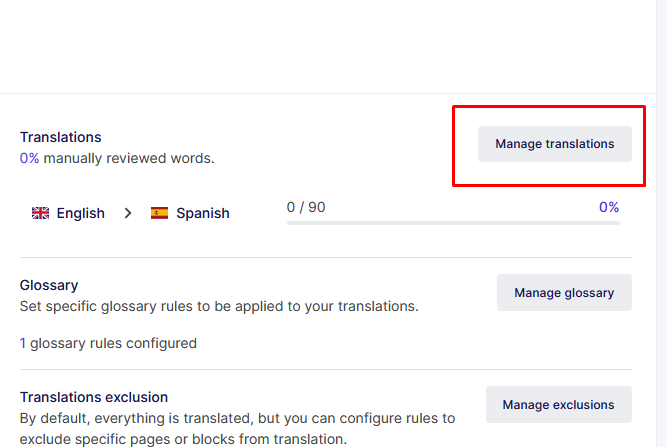
Use Manage translations to access and export your existing Weglot translation files.
Step C — Import into ConveyThis
Open the Import Translations page in your ConveyThis dashboard. Click Actions → Import, select your source and target language(s), then upload the file you exported.
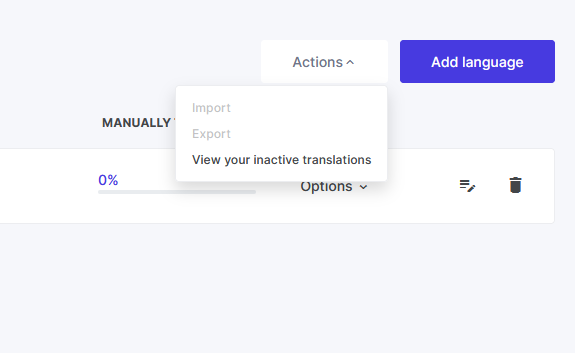
The same Import flow works for Weglot, Bablic, and any CSV or TMX export from other translation tools.
Importing from Bablic or other tools
Using Bablic or another platform? Export your translations as CSV or TMX from that tool’s dashboard, then follow steps 2–5 above in ConveyThis. The upload and mapping process is identical — you do not need a separate migration path for each provider.
Why this matters for your business
Translations are not just content — they represent real business value.
A multilingual website may contain:
- Product descriptions and ecommerce catalog pages
- Blog articles and content marketing assets
- Landing pages and conversion funnels
- Help center and support documentation
- Legal pages, privacy policies, and compliance text
- SEO-optimized pages with localized meta titles and descriptions
Re-translating everything can be expensive, time-consuming, and often completely unnecessary when the quality of your existing work is already good.
By importing existing translations, companies can focus on growth rather than repeating work they have already completed. Budget that would have gone to re-translation can go toward new markets, better glossaries, or human post-editing where it matters most.
Benefits of moving to ConveyThis
Many website owners explore Weglot alternatives — or switch from Bablic and other tools — because they want more flexibility, better pricing, additional customization options, or expanded language support. ConveyThis delivers on all of those fronts:
- Lower pricing with more words included at every tier — see our pricing page for a side-by-side comparison
- 200+ languages supported, well beyond Weglot’s ~110
- Visual translation editor for in-context edits on the live page
- Glossary and translation memory to keep terminology consistent
- Full SEO support — hreflang tags, translated meta data, and language subdirectories
- US-based company with responsive support
The migration process used to be the biggest obstacle. With 1-Click Import, that barrier is significantly reduced. Users can start taking advantage of ConveyThis features while keeping the translation content they have already invested in.
A better experience for growing websites
As websites grow, translation management becomes increasingly important. Businesses need tools that help them:
- Scale multilingual content efficiently across teams and markets
- Manage multiple languages from one dashboard
- Improve translation workflows with glossaries, memory, and visual editing
- Maintain consistent branding across every locale
- Expand internationally without unnecessary complexity
The ability to import existing translations removes one of the biggest challenges associated with platform migration. Combined with ConveyThis’s localization features — dynamic content support, image localization, and AI-assisted translation — growing sites get a platform built for scale, not just a language switcher.
Frequently asked questions
Can I import translations from Weglot, Bablic, or other platforms?
Yes. Export your translations as CSV or TMX from Weglot, Bablic, or any compatible tool, then upload the file in the ConveyThis dashboard under Import Translations. ConveyThis maps your strings to the correct pages and language pairs.
Will I lose my human-edited translations?
No — that is the entire point of 1-Click Import. Your edited strings, glossary preferences, and existing MT output are preserved so you do not start from zero, no matter which platform you are leaving.
Does ConveyThis support CSV and TMX files?
Yes. ConveyThis natively accepts CSV and TMX translation files — the standard formats exported by Weglot, Bablic, and most localization tools. See our import and export translations guide for sample file formats.
Is the import feature included on the free plan?
Yes. Translation import is free on every ConveyThis plan, with no per-import fees — whether you are migrating from Weglot, Bablic, or elsewhere.
How does ConveyThis compare to Weglot overall?
For a full feature and pricing breakdown, read our detailed Weglot vs ConveyThis comparison.
The bottom line
Technology should make things easier, not create more work.
ConveyThis’s 1-Click Translation Import is a practical feature that recognizes a simple reality: your translations already belong to you. You paid for them — in time, in budget, in care — and you should be able to take them wherever you go, whether you are leaving Weglot, Bablic, or any other provider.
Instead of starting over, businesses can bring their existing multilingual content into ConveyThis and continue growing their international presence without interruption.
For companies considering a switch, the question is no longer whether migration is possible — it is how quickly you want to get started.
Create your free account · Compare pricing · See all integrations